
Yes - ChatGPT has a LinkedIn connector
Connect ChatGPT to LinkedIn with Postbeam. Draft posts from your week, see what to post next, and schedule it all - just by chatting. Officially in the ChatGPT app marketplace, one click to install.
Free 7-day trial, then from $39/mo · Cancel anytime
Find it as Postbeam in the ChatGPT app marketplace - or search “Postbeam” in ChatGPT's app directory.
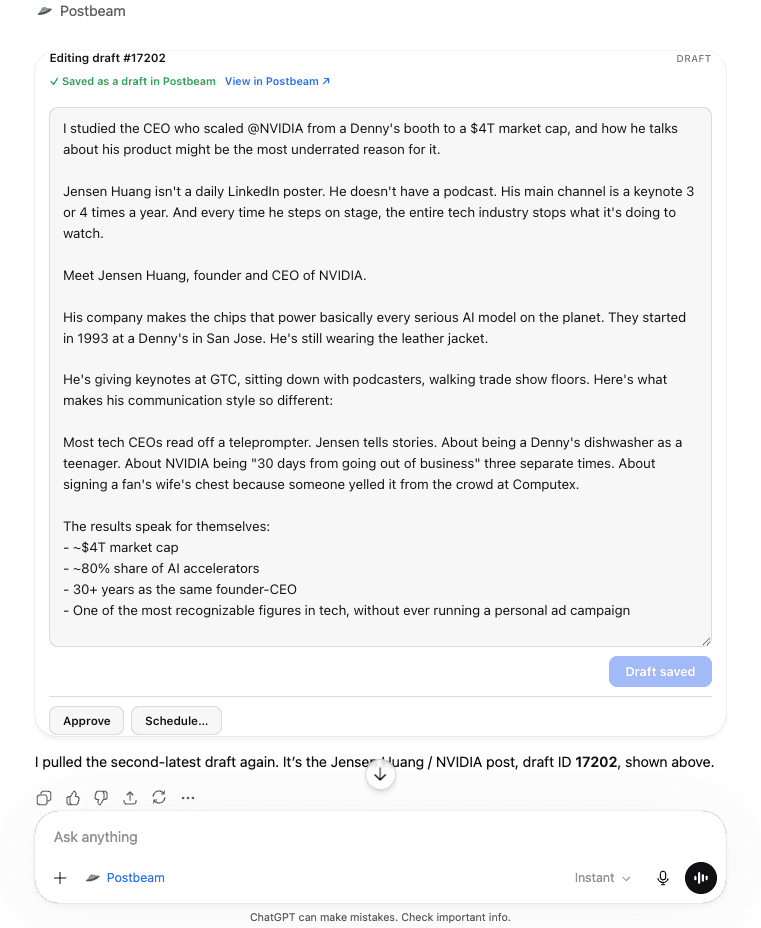
What ChatGPT can do once it's connected
The Postbeam app gives ChatGPT permission to run your LinkedIn workflow through your Postbeam account - and nothing publishes without your approval.
Draft posts from your week
Ask ChatGPT to pull raw material from your other connectors, Slack threads, Gmail, meeting recorders, and turn it into ready-to-review LinkedIn drafts in your voice.
Know what to post next
Ask what's working in your account and per-post analytics over 30, 90, or 365 days, then get your next post drafted in that exact style.
Schedule straight from chat
Edit copy, attach images, video, or carousels, then approve and schedule to your connected LinkedIn - all without leaving ChatGPT.
Run it on autopilot
Use ChatGPT's scheduled tasks so fresh drafts and analytics summaries land in your Postbeam queue every week.
For teams and agencies: ChatGPT can switch between every account you can access in Postbeam, keeping each person's drafts, approvals, and analytics separate.
Connect ChatGPT to LinkedIn in one click
Postbeam is officially in the ChatGPT app marketplace. No Developer mode, no code, no URLs to paste.
- 1
Open the Postbeam listing in ChatGPT's app directory
Open Postbeam in the ChatGPT app marketplace or search for “Postbeam” in ChatGPT's app directory. No Developer mode, no URLs to paste. - 2
Click Connect
One click on the listing page - that's the whole install. - 3
Authorize your Postbeam account
A secure OAuth sign-in opens - approve it and you're connected. New to Postbeam? Start a free 7-day trial. - 4
Done - mention Postbeam in any chat
Try “Ask Postbeam to draft a LinkedIn post about our launch” or “How did my last post perform?”
ChatGPT LinkedIn connector FAQ
Does ChatGPT have a LinkedIn connector?
Yes. Postbeam's LinkedIn connector is officially listed in the ChatGPT app marketplace. Install it in one click, authorize your Postbeam account, and ChatGPT can draft LinkedIn posts in your voice, pull your analytics, and schedule content, all from chat.
How do I connect ChatGPT to LinkedIn?
Open the Postbeam listing in the ChatGPT app marketplace (or search for Postbeam in ChatGPT's app directory), click Connect, and authorize your Postbeam account via a secure OAuth sign-in. Then mention Postbeam in any chat. No Developer mode, no URLs to paste - it takes about two minutes.
Can ChatGPT write and schedule LinkedIn posts?
Yes. Once connected, ChatGPT drafts posts in your voice using your Postbeam content training, saves every draft into Postbeam for review, lets you edit copy and attach images, video, or carousels, and can approve and schedule posts to your connected LinkedIn. It can also list posts by status and pull raw material from your other ChatGPT connectors like Slack, Gmail, and meeting recorders.
Is the ChatGPT LinkedIn connector safe?
Yes. The app authorizes through a secure OAuth flow to your Postbeam account - it never touches your LinkedIn password - and publishes through LinkedIn's official partner APIs. You can revoke access at any time from your settings.
Do I need a paid plan?
No paid ChatGPT plan is required - Postbeam is a listed app in the ChatGPT app marketplace, so it installs on free ChatGPT accounts too. (Only unlisted custom connectors via Developer mode require a paid plan.) You do need a Postbeam account, which starts with a free 7-day trial, then plans start from $39/mo.
Will it publish automatically?
No. Nothing publishes automatically. Drafts stay drafts until you approve and schedule them, so you always review before anything goes out to LinkedIn.
Something else? Email team@postbeam.ai.
Keep exploring
ChatGPT integration
The full documentation for the Postbeam app in ChatGPT - every feature, mock by mock.
Claude LinkedIn connector
Prefer Claude? Postbeam is in the Claude connector directory too.
LinkedIn MCP
The full MCP guide - including Gemini and Poke setup.
Pricing
Simple plans - the ChatGPT app is included in all of them.
Run LinkedIn from ChatGPT
Install the app, connect your Postbeam account, and start drafting, scheduling, and analyzing by chat.
Also works with Claude, Gemini & Poke - see the LinkedIn MCP.