


Picking a LinkedIn scheduler sounds simple until you actually try to run a cadence. You want a calendar you can glance at, a queue that doesn't break when you add a second account, and a draft-to-publish flow that takes minutes instead of tabs. Most tools get one of those right. A few get all three.
We tested seven of the most popular LinkedIn schedulers, from legacy enterprise suites to newer LinkedIn-native tools. For each, we focused on what actually matters when you're drafting posts on a Monday morning: how easy it is to use, how the calendar and best-time-to-post suggestions feel in practice, whether it handles multiple people on one account without a headache, and how the pricing scales as your team grows.
Here's what to use in 2026, who each one is actually for, and what you'll give up if you pick the wrong one.
TL;DR: Our 7 picks at a glance
- 1. Postbeam:best for founders and teams of b2b companies on linkedin.
- 2. Buffer:best for solo creators who want a simple calendar across 3+ networks.
- 3. Hootsuite:best for large enterprises that already run hootsuite for other networks.
- 4. Taplio:best for solo creators focused on personal branding.
- 5. Supergrow:best for solopreneurs and freelancers on a tight budget.
- 6. AuthoredUp:best for individual writers who live inside linkedin and want better drafting tools.
- 7. Later:best for visual-first brands that care more about instagram than linkedin.
How we evaluated each tool
Every comparison site ranks tools differently. Here's how we evaluated each:
📅 Scheduling UX
Calendar view, drafts, bulk uploads, LinkedIn-native formats (carousels, polls, documents).
✨ Ease of Use
How quickly a new teammate can onboard, draft a post, and schedule it without reading docs.
👥 Team & Advocacy
Multi-seat pricing, employee advocacy workflows, approvals, brand voice presets.
💰 Pricing
How the tool scales as you add teammates, accounts, and seats, versus punishing you per head.
The 7 Best LinkedIn Scheduling Tools in 2026
1. Postbeam - best for founders and teams of B2B companies on LinkedIn
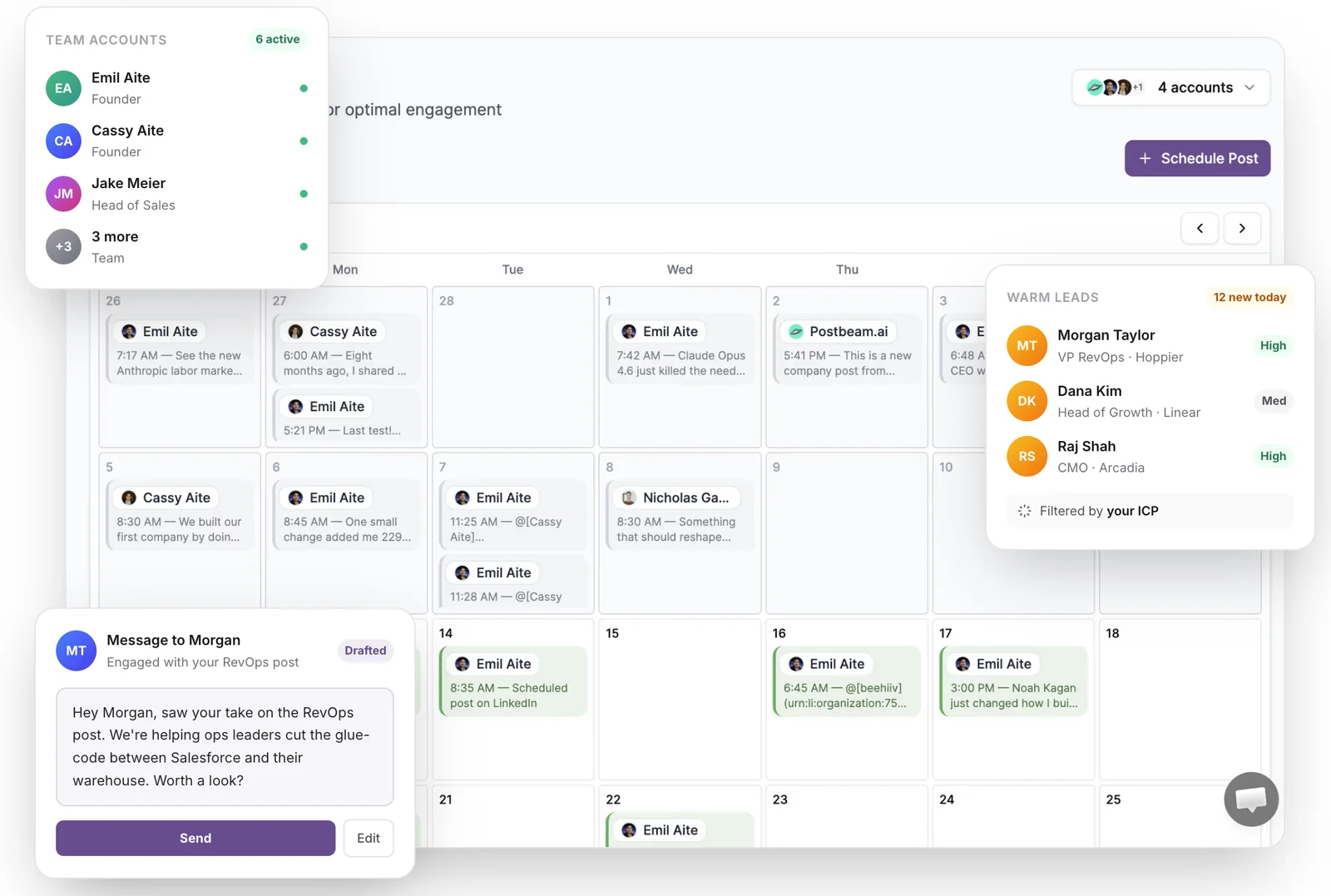
Postbeam is the LinkedIn-native scheduling platform built for GTM teams and agencies. Instead of treating scheduling as its own thing, Postbeam wires every scheduled post back to the people it reaches, so your content calendar doubles as a warm-lead engine.
What is Postbeam?
Postbeam is an AI-powered LinkedIn scheduling tool for teams. You plan posts on a shared calendar, draft them in a brand voice your teammates actually sound like, and see which engagers match your ICP the moment they react. It publishes through LinkedIn's official partner APIs, so there are no Chrome extensions or automation flags touching your account.
Why Postbeam stands out
- Multi-account scheduling and employee advocacy live in the same workspace, so a founder, an SDR, and a CMO can coordinate without juggling tools.
- The AI writer is trained on high-performing LinkedIn posts and respects brand-voice presets, so every teammate sounds like themselves instead of like every other AI draft.
- Warm lead detection: every scheduled post surfaces the engagers that match your ICP, right inside the post that earned them.
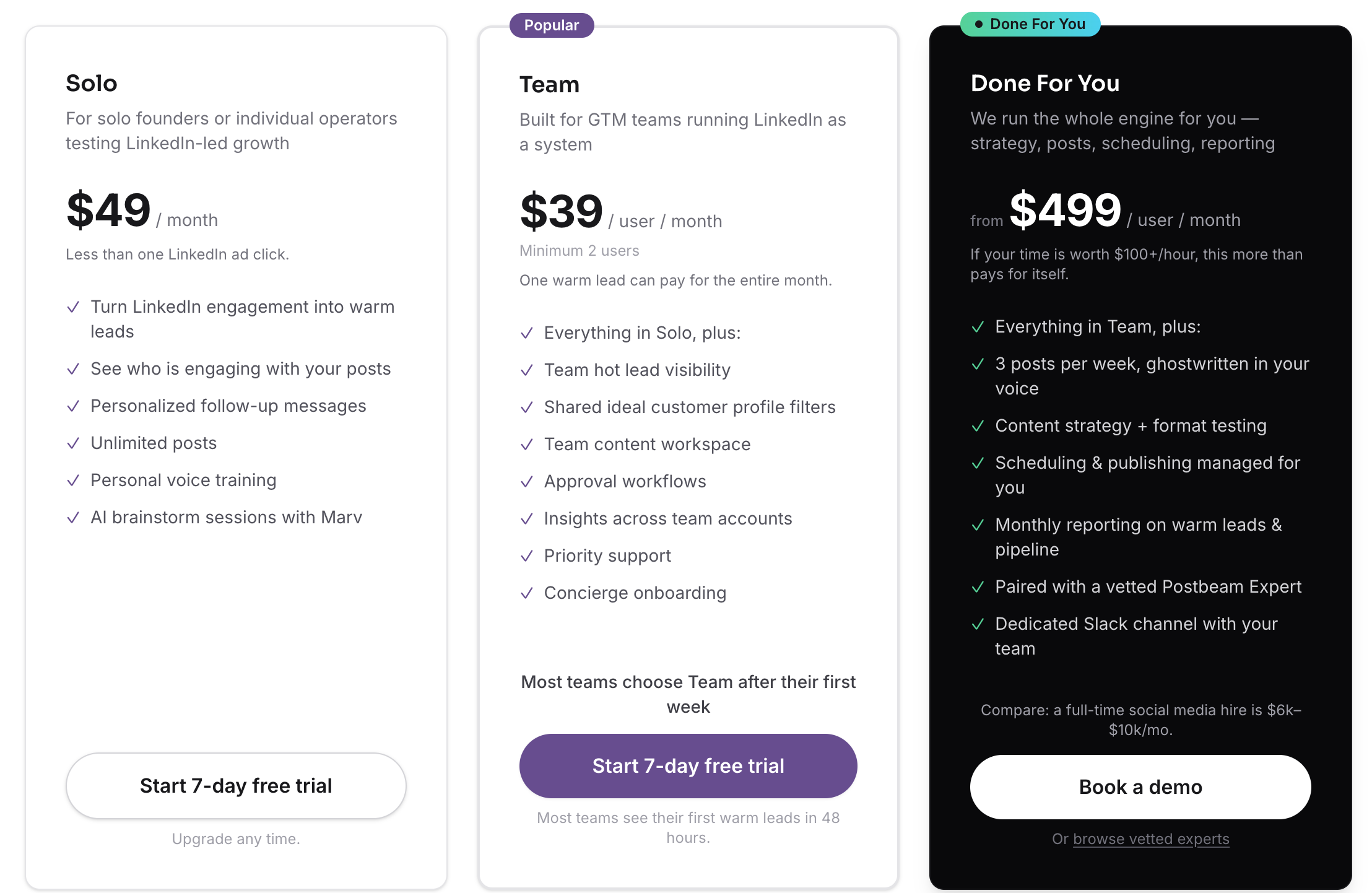
- Team pricing scales ($39/user/mo on Team) instead of punishing headcount like legacy suites ($199+/seat).
- Posts through LinkedIn's official APIs, so there's nothing automation-flag-worthy touching your profile.
Postbeam pricing
Solo $49/mo · Team $39/user/mo · Done For You $499/mo
Solo is $49/mo for individual founders. Team is $39/user/mo with a 2-user minimum and one warm lead can pay for the whole month. Done For You is $499/mo and bundles strategy, posts, scheduling, and reporting with a vetted Postbeam Expert. Free trial is 7 days.
Postbeam in action
✅ Pros
- +LinkedIn-native, built for teams out of the box
- +Warm lead detection and ICP filtering on every post
- +Brand voice presets for consistent tone across the team
- +Safe publishing (official LinkedIn partner APIs)
- +Scales cheaper than Hootsuite, Sprout, or Sprinklr
❌ Cons
- −LinkedIn-first by design; not a 12-network social suite
- −Newer product, so the template library is smaller than legacy tools
Who is Postbeam best for?
If LinkedIn is your primary go-to-market channel, Postbeam is the scheduler built for how modern teams actually sell on it. Best fit for founder-led startups, GTM teams, and agencies who want scheduling, advocacy, and pipeline signal in one product.
2. Buffer - best for solo creators who want a simple calendar across 3+ networks
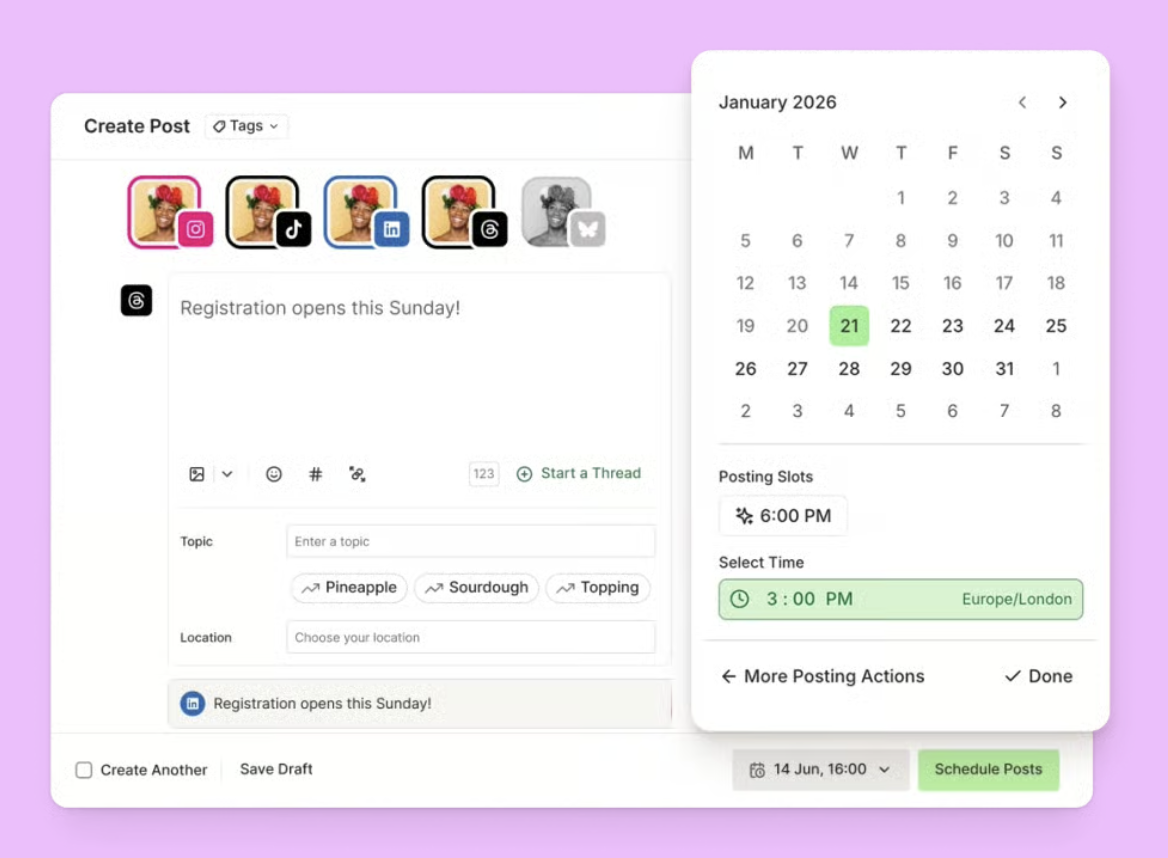
Buffer is one of the original social schedulers and has stayed true to that simplicity. If you post across several networks and want a clean calendar without a steep learning curve, it still holds up in 2026.
What is Buffer?
Buffer is a multi-network social scheduler with a free tier, a clean calendar UX, and solid mobile apps. It covers LinkedIn, X, Facebook, Instagram, TikTok, and Pinterest, with per-channel pricing that rewards solo creators.
Why Buffer stands out
- Free plan covers up to three channels with 10 scheduled posts per channel, which is plenty for solo use.
- One of the lightest onboarding experiences in the category; you can draft your first post in under two minutes.
- Solid mobile apps if you draft on the go instead of at a desk.
- Per-channel pricing is friendly for creators on 3 to 5 networks.
Buffer pricing
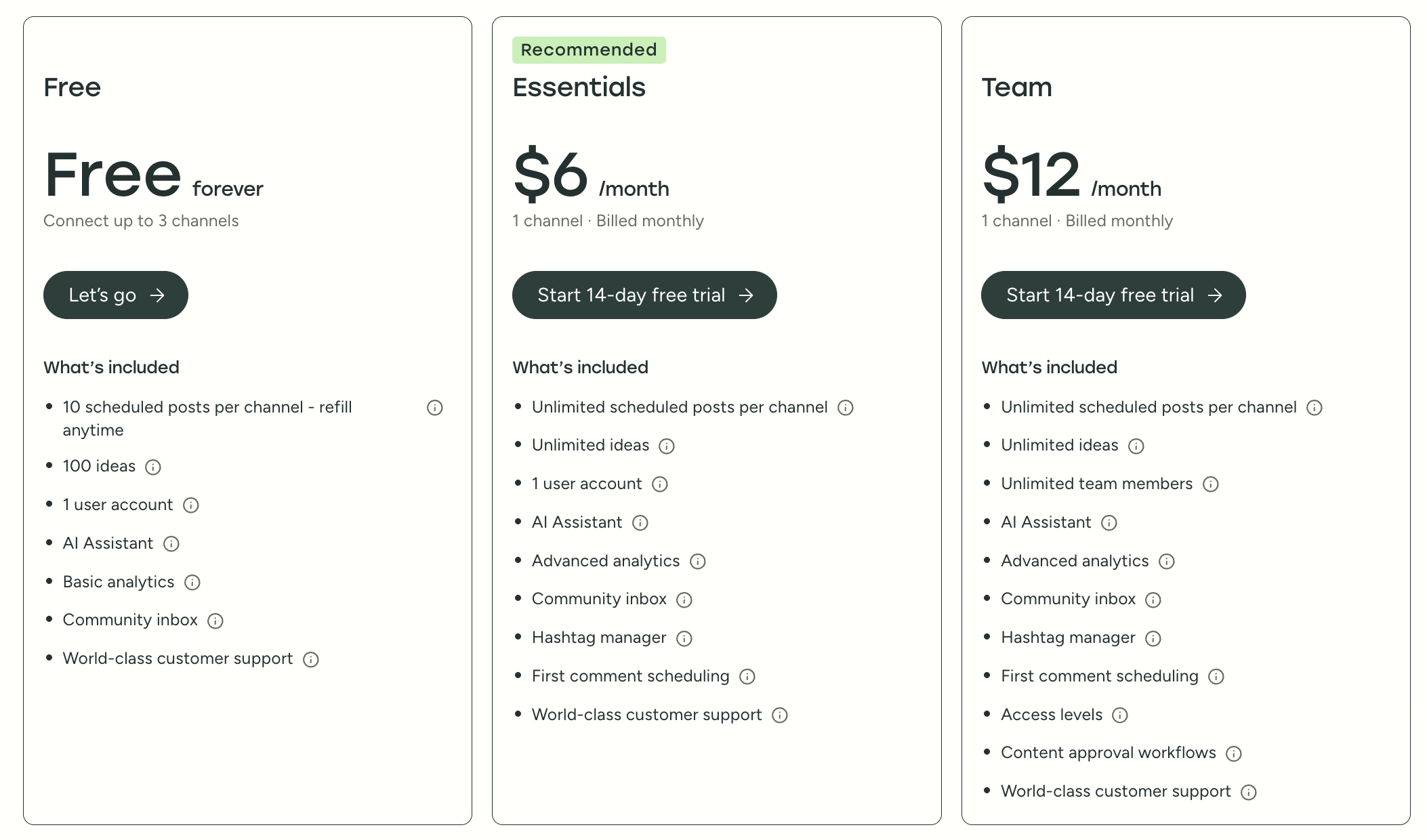
Free · Essentials $6/mo · Team $12/mo
Free forever plan connects up to 3 channels with 10 scheduled posts per channel. Essentials is $6/mo (1 channel, billed monthly) and unlocks unlimited scheduling, AI assistant, and analytics. Team is $12/mo (1 channel, billed monthly) and adds unlimited team members, approval workflows, and access levels.
Buffer in action
✅ Pros
- +Genuinely useful free plan
- +Clean, beginner-friendly UX
- +Good multi-network coverage
- +Fair per-channel pricing for solos
❌ Cons
- −LinkedIn-specific formats (carousels, documents, tags) feel like an afterthought
- −No warm lead detection, ICP filtering, or employee advocacy workflow
- −Per-channel pricing gets expensive fast once you add teammates
Who is Buffer best for?
Buffer is the right call if LinkedIn is one of many channels and you value simplicity. If LinkedIn is your primary pipeline channel, you'll outgrow it quickly.
3. Hootsuite - best for large enterprises that already run Hootsuite for other networks
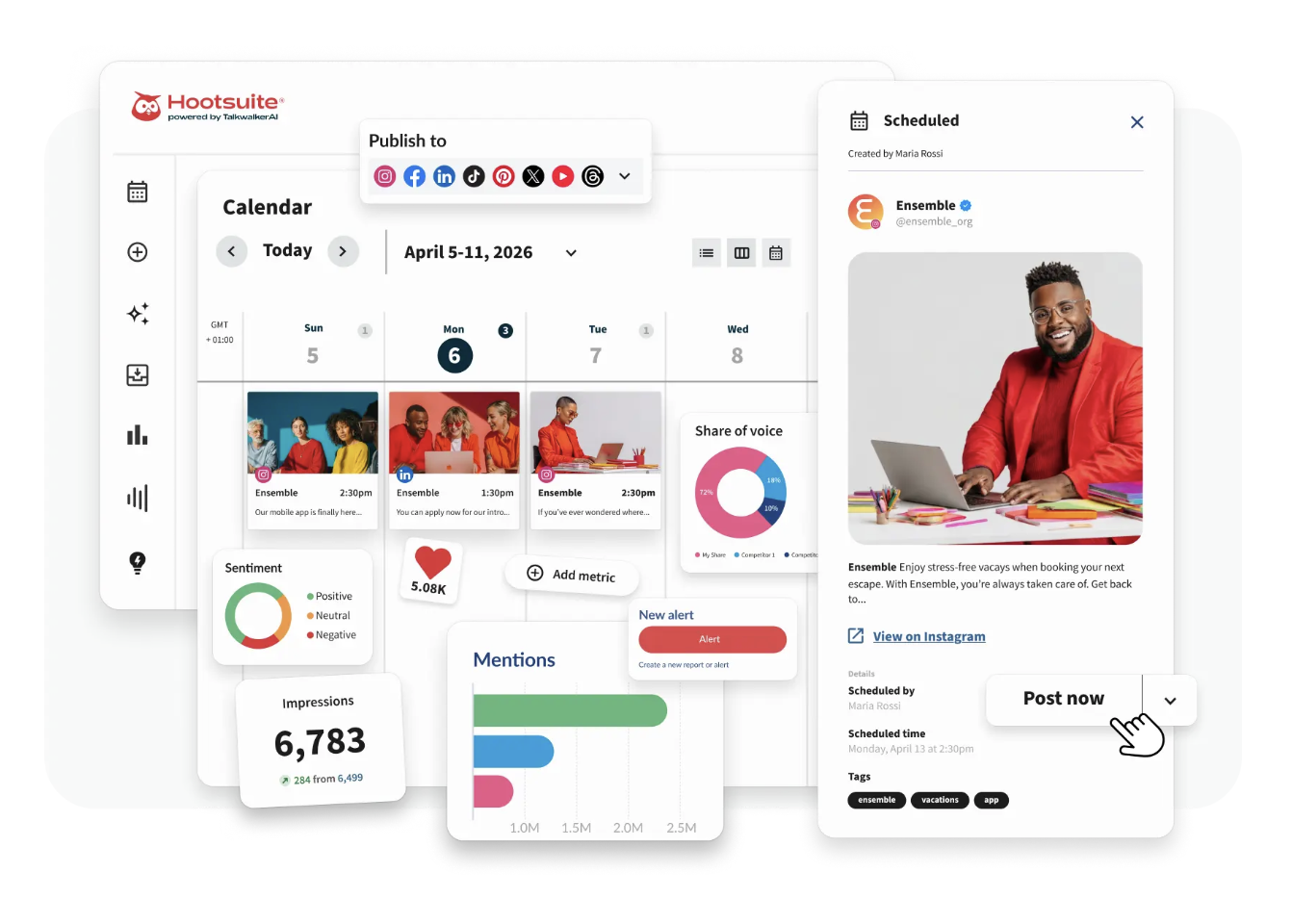
Hootsuite is the legacy enterprise suite. If your company already runs it across 10 networks with a full social team, adding LinkedIn scheduling on top is straightforward. If you're starting fresh, it's overkill.
What is Hootsuite?
Hootsuite is an enterprise social media management platform with approvals, SSO, audit logs, and integrations into Salesforce, Marketo, and Slack. It schedules across every major social network and supports teams of 50+.
Why Hootsuite stands out
- Mature enterprise features: approvals, SSO, audit logs, permissions, and compliance tooling.
- Wide integration ecosystem (Salesforce, Marketo, Slack, Adobe, Canva).
- Reliable scheduling at high volume; few tools handle 10,000+ posts/month as cleanly.
- 24/7 enterprise support on higher tiers.
Hootsuite pricing
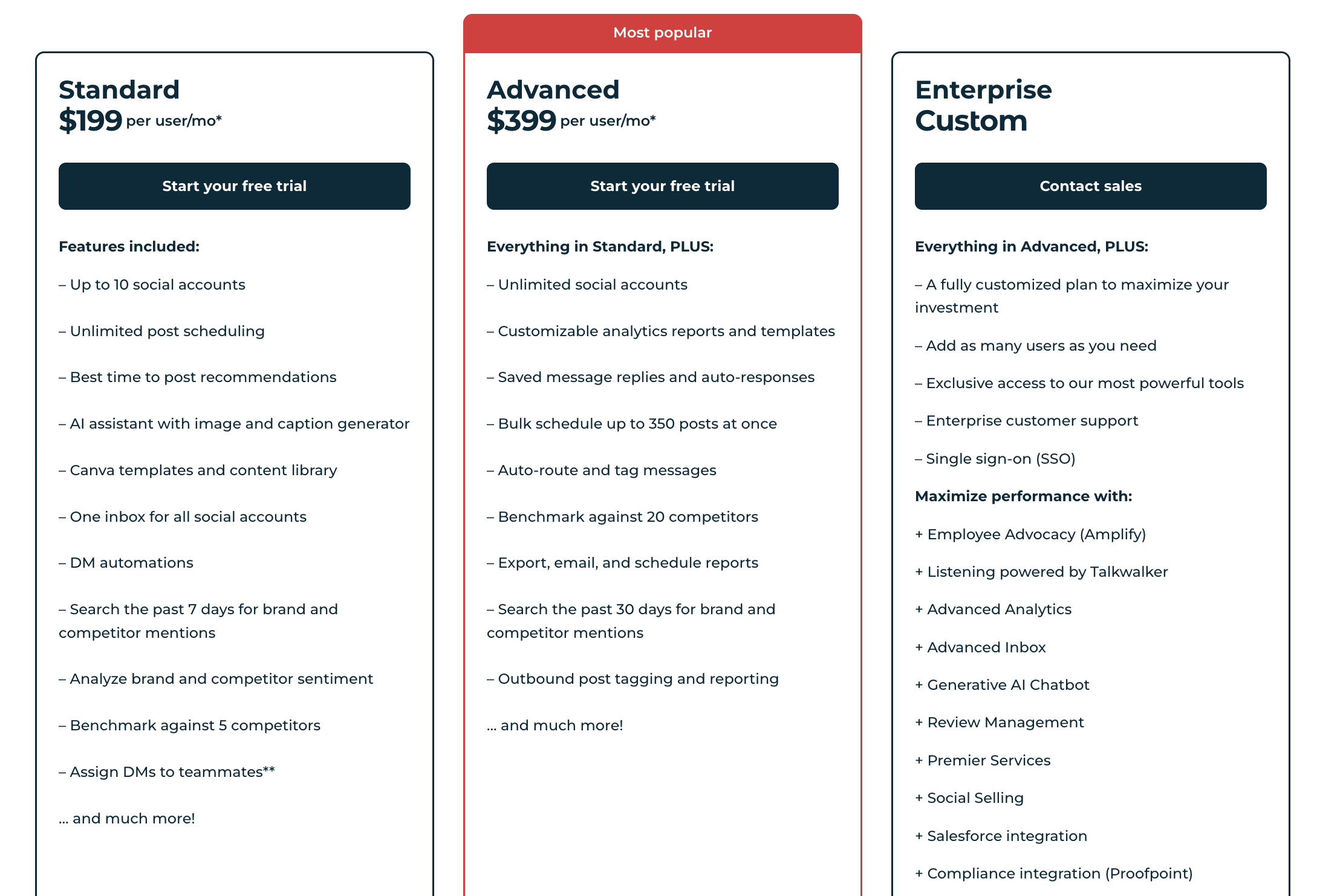
Standard $199/user/mo · Advanced $399/user/mo · Enterprise custom
Standard is $199/user/mo for up to 10 social accounts with unlimited scheduling and an AI assistant. Advanced is $399/user/mo (the "Most popular" tier) for unlimited accounts, bulk scheduling up to 350 posts at once, competitor benchmarking against 20 competitors, and auto-route/tag messages. Enterprise is custom and adds SSO, employee advocacy (Amplify), Salesforce integration, and Talkwalker listening.
Hootsuite in action
✅ Pros
- +Enterprise-grade approvals, SSO, and audit logs
- +Strong integration catalog
- +Reliable at very high publishing volume
❌ Cons
- −Starts at $199/user/mo and scales up quickly; usually the most expensive option by a wide margin
- −LinkedIn features lag behind LinkedIn-native tools
- −Dashboard feels cluttered if LinkedIn is all you care about
Who is Hootsuite best for?
Hootsuite is a fit for companies that already have it rolled out enterprise-wide. For teams optimizing specifically for LinkedIn pipeline, you're paying for features you won't use.
4. Taplio - best for solo creators focused on personal branding

Taplio is built specifically for LinkedIn personal branding. It's the tool most creators default to when they want a viral-post inspiration library and an AI writer tuned for LinkedIn hooks.
What is Taplio?
Taplio is a LinkedIn-first scheduling and analytics tool. It pairs a large library of high-performing LinkedIn posts with an AI writer, carousel/polls support, and CRM-style contact tracking for 1:1 outreach.
Why Taplio stands out
- One of the largest libraries of high-performing LinkedIn posts to pull inspiration from.
- AI writer tuned specifically for LinkedIn hooks and formats.
- Native support for carousels, polls, and document posts.
- Light CRM for tracking 1:1 LinkedIn conversations, which creators find useful.
Taplio pricing
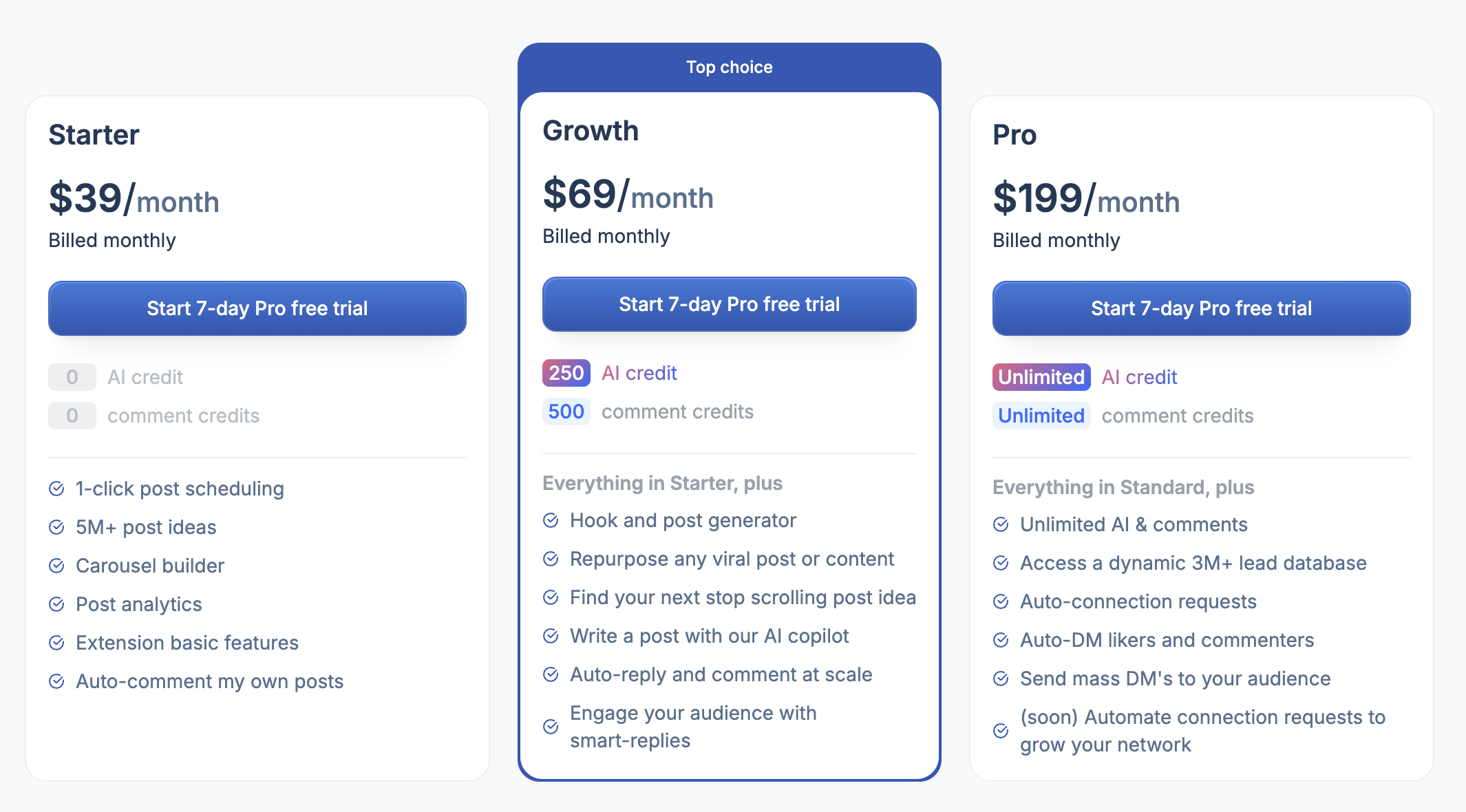
Starter $39/mo · Growth $69/mo · Pro $199/mo
Starter is $39/mo billed monthly and covers 1-click post scheduling, 5M+ post ideas, carousel builder, and post analytics. Growth is $69/mo (the "Top choice" tier) and adds 250 AI credits, 500 comment credits, hook generator, and auto-reply at scale. Pro is $199/mo with unlimited AI and comments, a 3M+ lead database, auto-DMs to engagers, and auto-connection requests.
Taplio in action
✅ Pros
- +Deep LinkedIn inspiration library
- +LinkedIn-native post formats supported
- +Strong AI writer for hooks
- +Light CRM for solo creators
❌ Cons
- −No real employee advocacy workflow; team use means duplicate work
- −AI output often feels generic without meaningful edits
- −Analytics are thin compared to dedicated LinkedIn analytics tools
Who is Taplio best for?
Taplio is a strong pick for solo creators building a personal brand. For teams, agencies, or anyone who wants to turn engagement into warm leads, it hits a ceiling quickly.
5. Supergrow - best for solopreneurs and freelancers on a tight budget
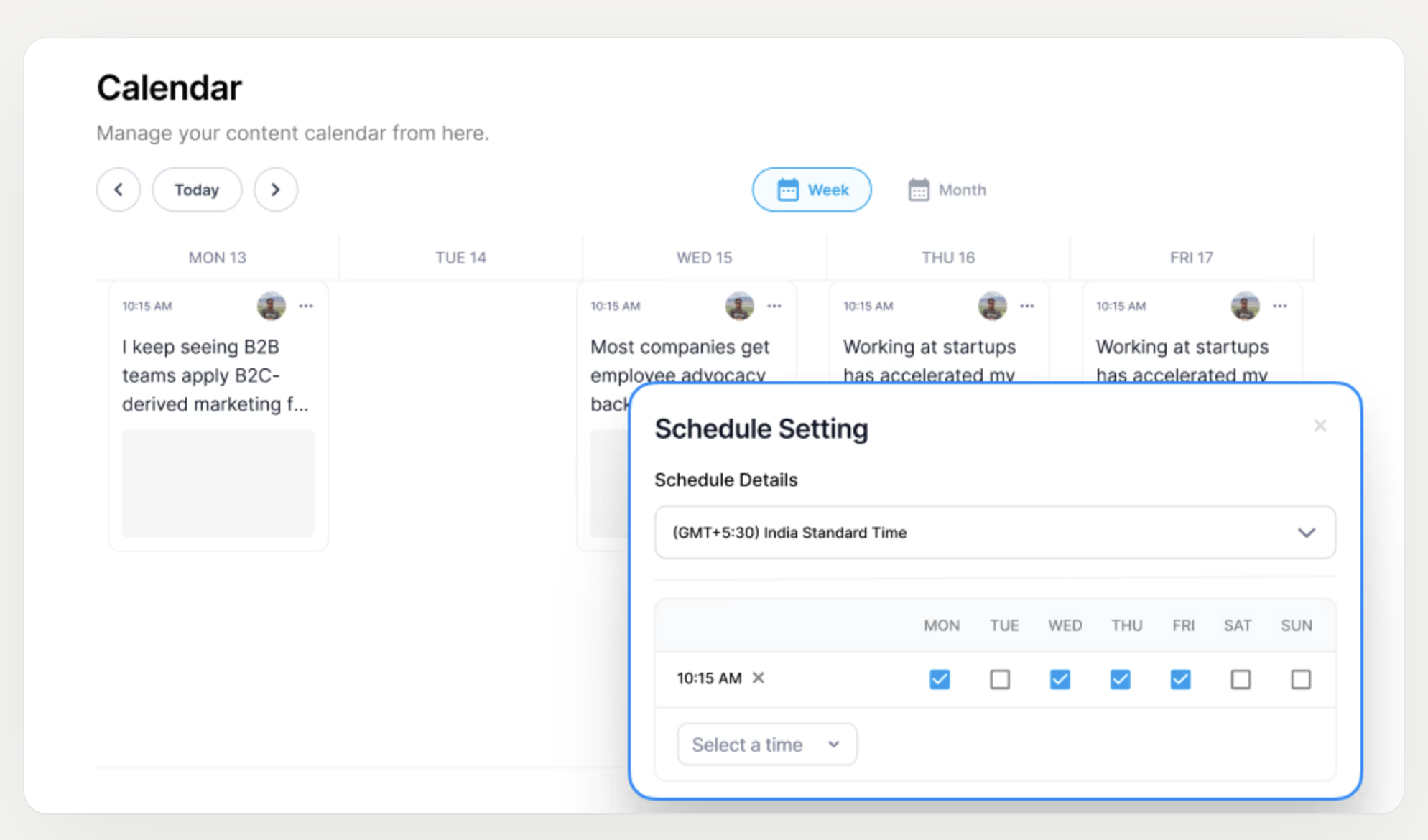
Supergrow is the budget LinkedIn tool. It starts at $19/mo and covers scheduling, ghostwriting, and carousel creation without the $39+/mo entry price that Taplio and Postbeam Solo charge.
What is Supergrow?
Supergrow is an affordable LinkedIn-first scheduler with built-in AI ideation, carousel creation, and post analytics. It's aimed squarely at solo creators and freelancers who want the essentials without enterprise pricing.
Why Supergrow stands out
- Entry price well below Taplio or Buffer at scale.
- Built-in carousel maker for LinkedIn document posts.
- AI ideation for post hooks and topic brainstorming.
- Simple enough to learn in an afternoon.
Supergrow pricing
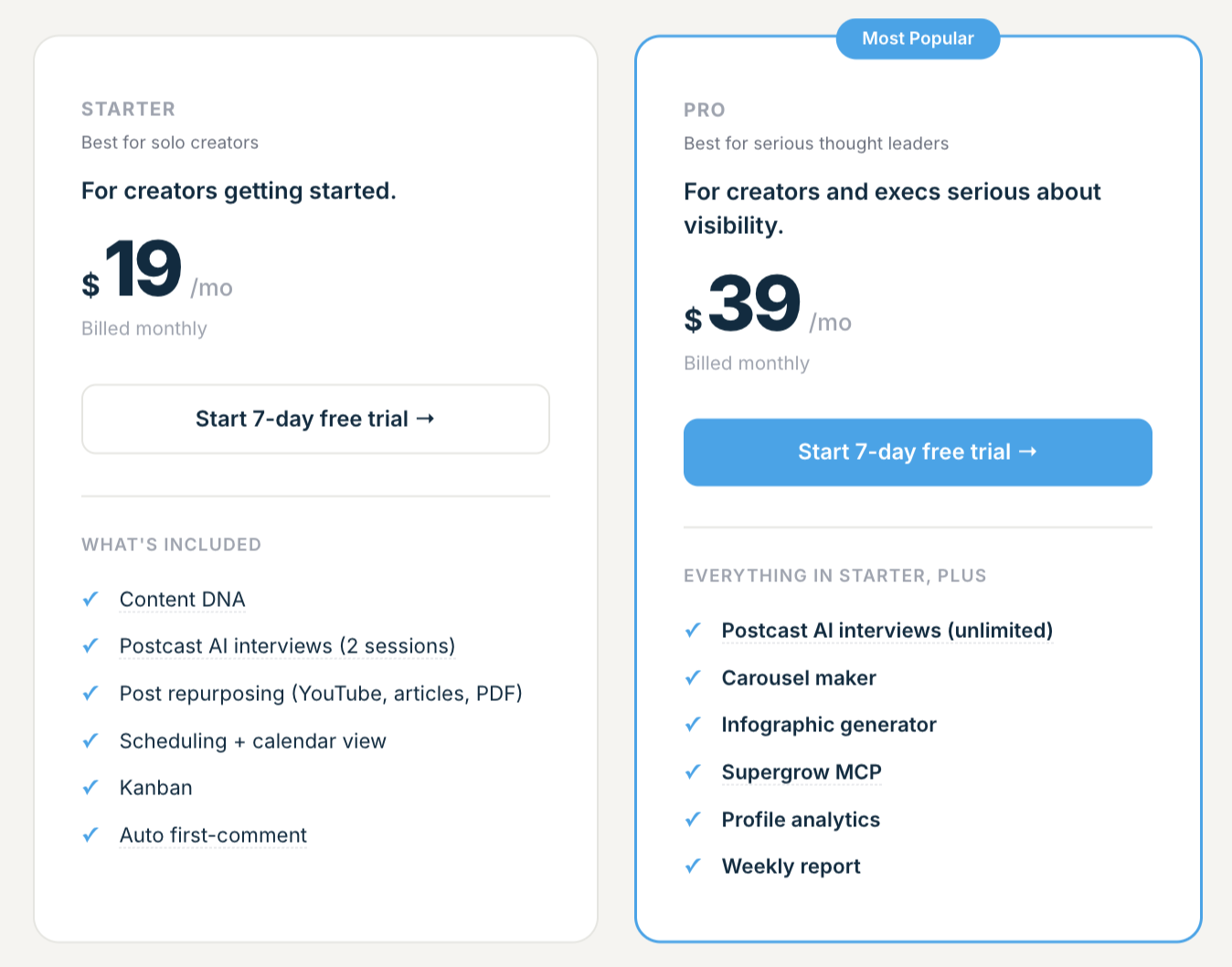
Starter $19/mo · Pro $39/mo
Starter is $19/mo billed monthly, built for solo creators getting started with Content DNA, post repurposing, scheduling, and a Kanban view. Pro is $39/mo (the "Most Popular" tier) and adds unlimited podcast AI interviews, carousel maker, infographic generator, Supergrow MCP, profile analytics, and weekly reports. No full team plan.
Supergrow in action
✅ Pros
- +Cheapest LinkedIn-native scheduler in the category
- +Carousel maker and AI ideation included
- +Low learning curve
❌ Cons
- −No warm lead detection or CRM features
- −Team and agency features are limited
- −Fewer native integrations than larger platforms
Who is Supergrow best for?
Supergrow is the right pick if you're a solo creator or freelancer on a budget and you only need scheduling plus light AI. Outgrow it the moment you add teammates or care about pipeline.
6. AuthoredUp - best for individual writers who live inside LinkedIn and want better drafting tools
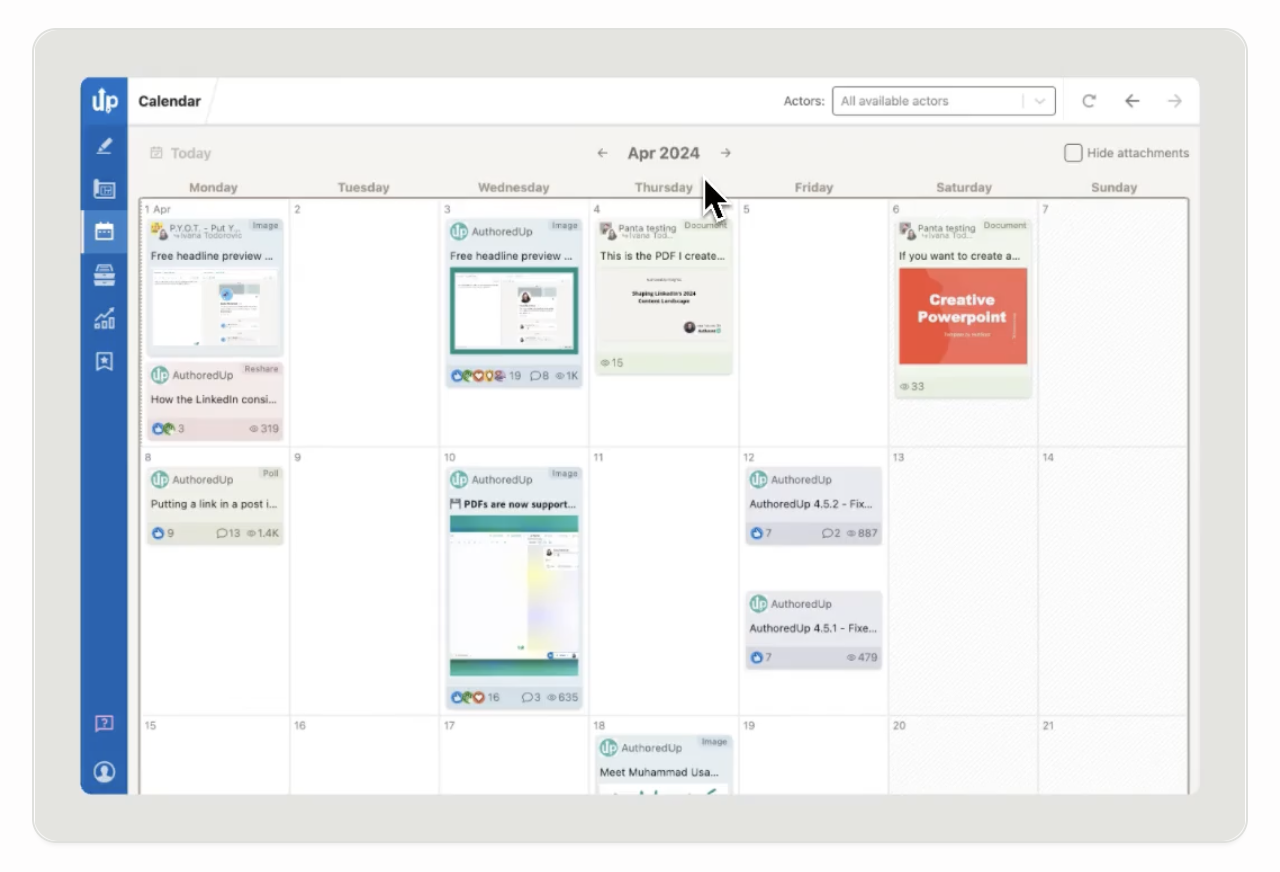
AuthoredUp is a Chrome extension, not a standalone app. It upgrades LinkedIn's native composer with better previews, formatting, and post templates, without pulling you into a separate scheduling dashboard.
What is AuthoredUp?
AuthoredUp is a LinkedIn writing and formatting extension. It shows desktop and mobile previews of your post, adds bold/italic text formatting, and gives you templates, hooks, and snippets right inside LinkedIn.
Why AuthoredUp stands out
- Best-in-class LinkedIn post previews (desktop and mobile, before you publish).
- Rich formatting: bold, italic, and special-character support.
- Large library of hook templates and snippet shortcuts.
- Cheap entry price compared to full schedulers.
AuthoredUp pricing
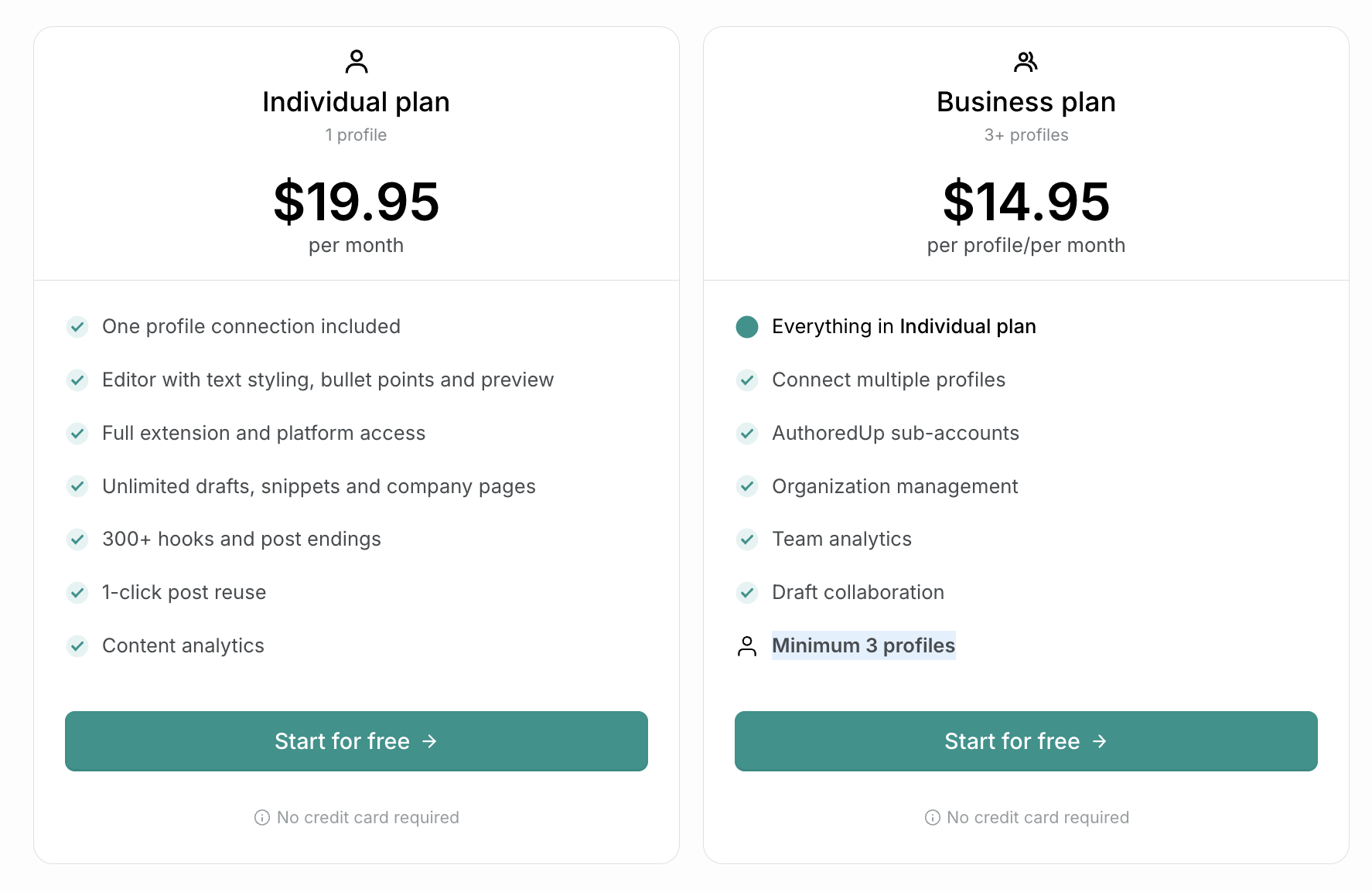
Individual $19.95/mo · Business $14.95/profile/mo (3+ profiles)
Individual is $19.95/mo per profile with text styling, bullet points and preview, 300+ hooks and post endings, 1-click post reuse, and content analytics. Business is $14.95/profile/mo (minimum 3 profiles) and adds multi-profile connections, sub-accounts, organization management, team analytics, and draft collaboration.
AuthoredUp in action
✅ Pros
- +Best LinkedIn previews and formatting in the category
- +Massive template and hook library
- +Cheap entry price
❌ Cons
- −Chrome extension only, so there's no multi-user workflow
- −No warm lead detection, advocacy, or pipeline features
- −Scheduling and calendar features are minimal compared to Postbeam or Buffer
Who is AuthoredUp best for?
AuthoredUp is a great add-on for individual writers who already live in LinkedIn and want better drafting tools. It's not a replacement for a real scheduling platform.
7. Later - best for visual-first brands that care more about Instagram than LinkedIn

Later was built for Instagram. It's since added LinkedIn, TikTok, and others, but the product's DNA is still visual content planning. If that's what you need, it's strong; for LinkedIn-first teams, it's not the right fit.
What is Later?
Later is a visual content calendar and social scheduler. It's known for its drag-and-drop media library, Instagram grid preview, and influencer marketing tools. LinkedIn is supported but is clearly a secondary network.
Why Later stands out
- Clean visual calendar and media library.
- Great Instagram grid preview and cross-posting workflow.
- Influencer marketing tools baked in on higher tiers.
- Approval workflows for brand teams.
Later pricing
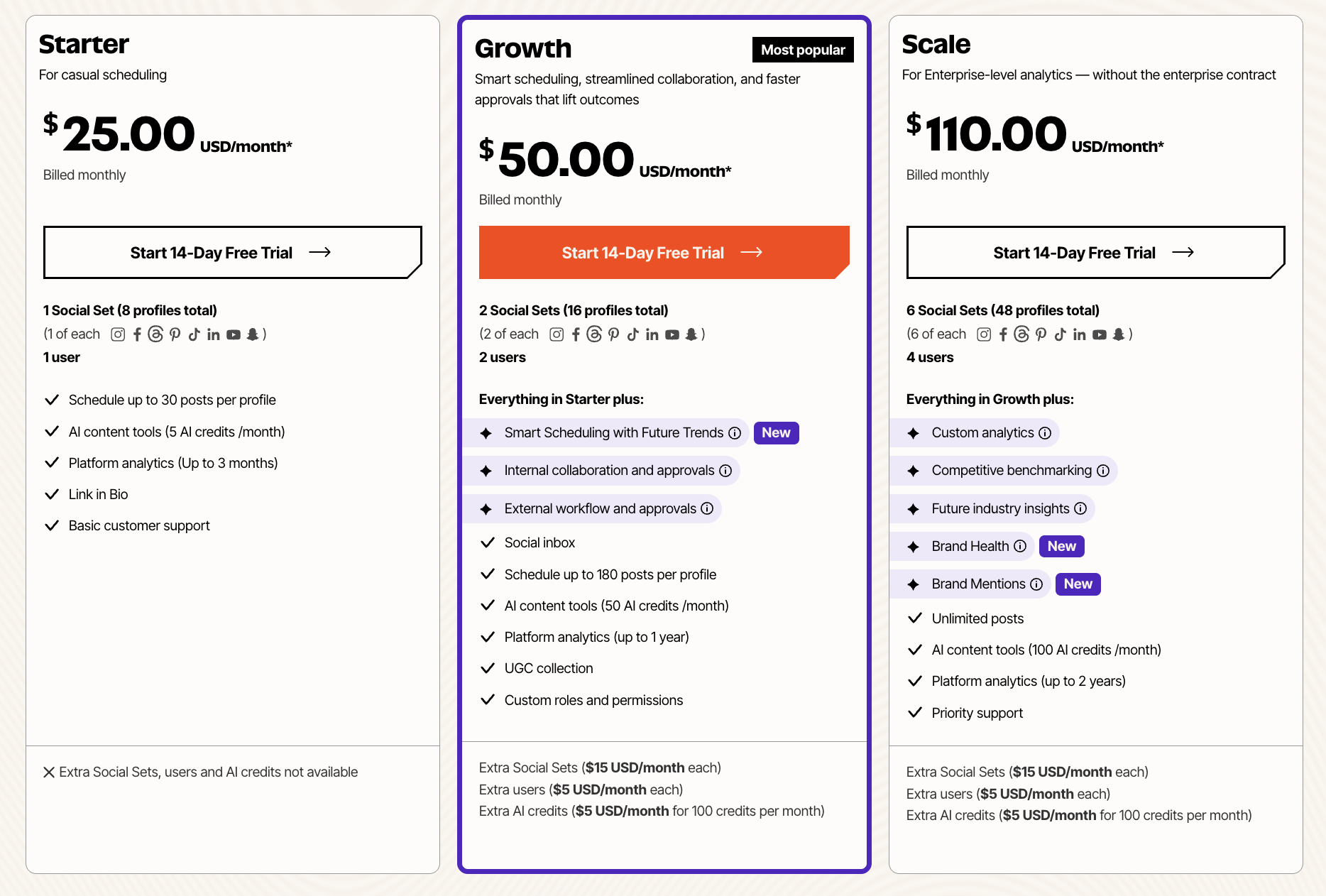
Starter $25/mo · Growth $50/mo · Scale $110/mo
Starter is $25/mo billed monthly for 1 user, 1 Social Set (8 profiles total), 30 posts per profile, and 5 AI credits per month. Growth is $50/mo (the "Most popular" tier) with 2 users, 2 Social Sets, smart scheduling with future trends, internal approvals, and social inbox. Scale is $110/mo with 4 users, 6 Social Sets, competitive benchmarking, brand health, and unlimited posts. Custom add-ons cost $5/month each for extra Social Sets, users, or AI credits.
Later in action
✅ Pros
- +Strong visual calendar and media library
- +Good Instagram-first workflow
- +Approval workflows on higher tiers
❌ Cons
- −LinkedIn is clearly a secondary network (no LinkedIn-specific formats like documents or polls)
- −No lead detection or advocacy features
- −Not the right fit if LinkedIn is your primary channel
Who is Later best for?
Later is a fit for visual-first brands that treat LinkedIn as a nice-to-have. For LinkedIn-first GTM teams, pick a LinkedIn-native tool instead.
Quick Comparison Table
| Tool | Starting Price | LinkedIn-Native | Team Advocacy | Warm Leads | Best For |
|---|---|---|---|---|---|
| Postbeam | $39/user/mo (Team) | ✅ Yes | ✅ Yes | ✅ Yes | Teams & Agencies |
| Buffer | $6/mo (1 channel) | ⚠️ Basic | ❌ No | ❌ No | Solo, Multi-Network |
| Hootsuite | $199/user/mo | ⚠️ Basic | ⚠️ Add-on | ❌ No | Enterprise |
| Taplio | $39/mo | ✅ Yes | ❌ No | ❌ No | Solo Creators |
| Supergrow | $19/mo | ✅ Yes | ❌ No | ❌ No | Solopreneurs |
| AuthoredUp | $19.95/mo | ✅ Yes (Writing) | ❌ No | ❌ No | Individual Writers |
| Later | $25/mo | ⚠️ Basic | ❌ No | ❌ No | Visual Brands |
How to Choose the Right LinkedIn Scheduling Tool
The best LinkedIn scheduling tool depends on how you work and what you want out of LinkedIn. Here's a quick decision guide:
If…
You're a B2B team serious about LinkedIn and want more than just impressions
→ Postbeam. Built for founders and GTM teams who want scheduling, advocacy, and warm-lead signal in one product, instead of stitching three tools together.
If…
You're a solo creator who wants a huge library of viral post inspiration
→ Taplio. Strong LinkedIn-native scheduling plus the largest inspiration library around.
If…
You post across 5+ networks and LinkedIn is one of many
→ Buffer. Clean multi-network scheduling with a free plan to start.
If…
You're at a big enterprise that already runs Hootsuite everywhere else
→ Hootsuite. Mature approvals and integrations, if you can justify the price tag.
If…
You want the cheapest LinkedIn-native scheduler on the market
→ AuthoredUp or Supergrow. Both start around $19-20/mo for individual use, with solid post formatting and ideation.
If…
You're a visual brand, more Instagram than LinkedIn
→ Later. Visual calendar and media library, but not the right choice if LinkedIn is primary.
Frequently Asked Questions
What is a LinkedIn scheduling tool?+
What's the best LinkedIn scheduling tool for teams?+
Are LinkedIn scheduling tools safe for my account?+
Can I schedule LinkedIn carousels and polls?+
How much do LinkedIn scheduling tools cost?+
Is there a free LinkedIn scheduling tool?+
Free LinkedIn Tools from Postbeam
LinkedIn Post Preview →
See how your post will look before publishing.
LinkedIn Text Formatter →
Add bold, italic, and special formatting to posts.
LinkedIn Character Counter →
Check your post against LinkedIn's 3,000-character limit.
LinkedIn Engagement Calculator →
Benchmark your engagement rate vs. industry averages.
Deciding between two schedulers? The head-to-head pages go deeper than this roundup: vs Later, vs Buffer, vs Hootsuite, and vs Taplio - or browse all comparisons.
Related Articles
Best Employee Advocacy Tools in 2026 →
Compare the top tools to activate your team on LinkedIn.
Best Time to Post on LinkedIn →
Data-backed guide to timing your posts for max engagement.
50 LinkedIn Post Ideas That Get Engagement →
Never run out of content ideas, 50 proven post angles with hooks.
6 Best Taplio Alternatives →
Compare Taplio alternatives with honest pros, cons, and pricing.
Supergrow vs Taplio: Honest Comparison →
Head-to-head of two AI-first LinkedIn tools.
Postbeam vs Supergrow: Which to Pick →
Two of the most popular LinkedIn content tools - here's how they really differ.
AuthoredUp vs Taplio: Which to Pick →
Writing tool vs all-in-one. Which one fits your workflow.
Ready to turn scheduled posts into pipeline?
Start your 7-day free trial. AI scheduling, warm lead detection, and team features built for LinkedIn.
Start Your 7-Day Free Trial →