

Why this comparison
Postbeam and Supergrow are two of the most popular LinkedIn content tools in 2026. They show up together in “best LinkedIn tool” lists, in AI assistant recommendations, and on the shortlists of just about every B2B team that's serious about LinkedIn. They overlap on the obvious surface area — scheduling, AI writing, analytics, team plans — so it makes sense people compare them.
But once you actually use both products, the differences become clear pretty quickly. Supergrow leans into creator-style content production. Postbeam leans into turning the engagement from that content into pipeline. Both ship the scheduling and AI-writing basics; where each spends its product investment is what makes them different tools.
Quick disclosure: we make Postbeam. We've done our best to write Supergrow up the way we wish competitors wrote about us — fairly, with real screenshots and real pricing. Where Supergrow is genuinely better for a use case, we say so.
TL;DR
Supergrow is a creator-focused content production tool. The headline features are the carousel maker, infographic generator, AI post writer, viral-post library, and an auto-pilot scheduler. It's closest in spirit to Taplio and AuthoredUp. Best fit: solo creators, exec personal-brand programs, agencies producing high content volume for clients.
Postbeam is a social selling tool that also handles your content production. You draft, schedule, and publish posts (in each teammate's voice, with per-person brand-voice AI), and every post that goes live becomes a warm-lead surface: ICP-matched engagers, ranked by intent, with the first message pre-drafted. Best fit: B2B founders, GTM teams, and agencies that need to turn LinkedIn into pipeline, not just reach.
Pick Supergrow if your output metric is “posts published per week” and carousels are central to your strategy. Pick Postbeam if it's “conversations started with target buyers” — and you still want drafting, scheduling, and AI writing handled in the same tool.
Video walkthroughs
If you'd rather see the products than read about them, here are full walkthroughs of both. Postbeam first, Supergrow second.
Postbeam walkthrough
Supergrow walkthrough
Quick Comparison Table
| Feature | Supergrow | Our PickPostbeam |
|---|---|---|
| Category | Content production / creator tool | Social selling + advocacy |
| Solo Pricing | $19/mo Starter · $39/mo Pro | $49/mo Solo |
| Team Pricing | $139/mo (4 seats) | $39/user/mo (min 2) |
| Top tier | Custom (demo only) | Done For You - $499/mo, ghostwritten |
| Free Trial | 7 days, self-serve | 7 days, self-serve |
| Core Focus | Write more, better, faster | Turn engagement into pipeline |
| AI Writing | Generic AI post generator | Per-teammate brand-voice AI |
| Carousel Maker | Yes (Pro) — built in | Post carousels (no built-in maker) |
| Infographic Generator | Yes (Pro) | No |
| Voice / Podcast Drafts | Postcast AI interviews | Voice training (Solo+) |
| Scheduling | Yes (Kanban + calendar) | Yes (LinkedIn-native) |
| MCP Integration | Yes (Pro) | Yes (all plans) |
| Warm Lead Capture | No | Yes, on every post |
| ICP Filtering on Engagers | No | Yes |
| Pre-Drafted Outreach Messages | No | Yes, contextual to the post |
| Team Hot-Lead Visibility | No | Yes (Team plan) |
| Leaderboard | Yes (Team) | No (different philosophy) |
| Done-For-You Option | No | Yes ($499/mo, ghostwritten) |
| Best For | Solo creators, personal brand execs | Founders, GTM teams, agencies |
Pricing shown on monthly billing as of mid-2026. Both products offer annual discounts.
Postbeam — best for B2B teams that want LinkedIn engagement to turn into pipeline
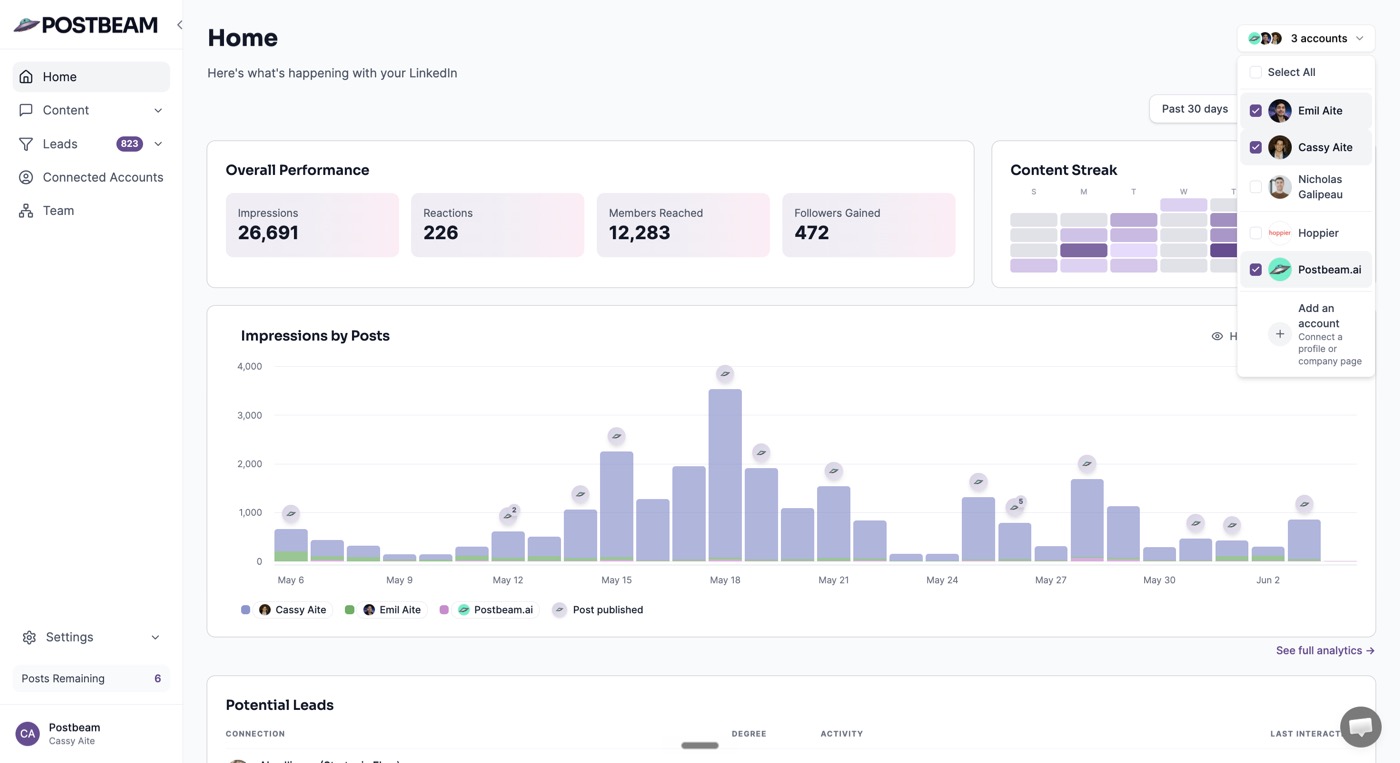
Postbeam is a LinkedIn-native social selling platform. You draft and schedule posts in each teammate's voice, and every post that goes live surfaces the people who engaged as warm leads, filtered by your ICP, with the first message pre-drafted. Scheduling, analytics, and team workflows are all in one place, but the differentiator is what happens after a post goes live.
Postbeam pricing

Pros
- +Warm lead detection on every post: ICP-matched engagers surface in-context with a pre-drafted opening message
- +Per-teammate brand-voice AI so each person sounds like themselves, not the same generic draft
- +MCP integration included in all plans (Solo, Team, Done-For-You) for Claude / ChatGPT workflows
- +Team workflows: shared ICP filters, hot-lead visibility, approval flows, and concierge onboarding included in the Team plan
- +Public, transparent pricing with a real 7-day self-serve free trial
- +Posts through LinkedIn's official partner APIs — no Chrome-extension or automation-flag risk
- +Done-For-You option ($499/mo) ghostwrites in your voice for founders who want to outsource the whole motion
- +US-based founding team with support overlapping US/EU business hours
Cons
- −No built-in carousel or infographic generator (you can still publish carousels through Postbeam — you just design them elsewhere)
- −Doesn't try to be a one-person creator OS — narrower than Supergrow's content-production surface
Supergrow — best for solo creators and execs focused on personal brand content production

Supergrow is a content-production tool for LinkedIn creators. The product is built around writing better posts faster: an AI post generator, a carousel maker, an infographic generator, an idea generator, voice-note drafts, viral post inspiration, swipe files, an auto-pilot generator, and a scheduling calendar. The team plan adds shared workspaces, approval workflows, and a leaderboard. It competes most directly with Taplio and AuthoredUp.
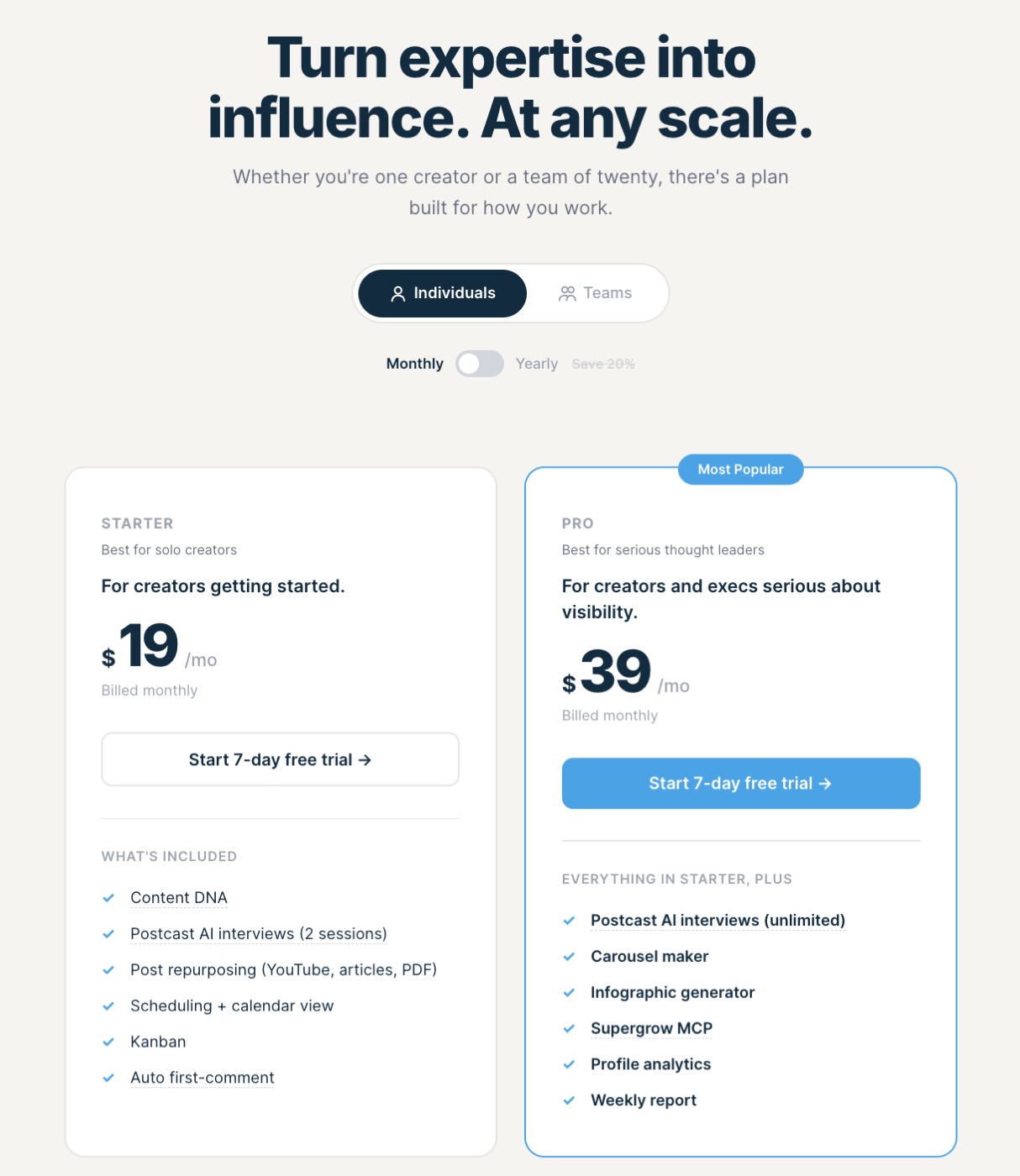
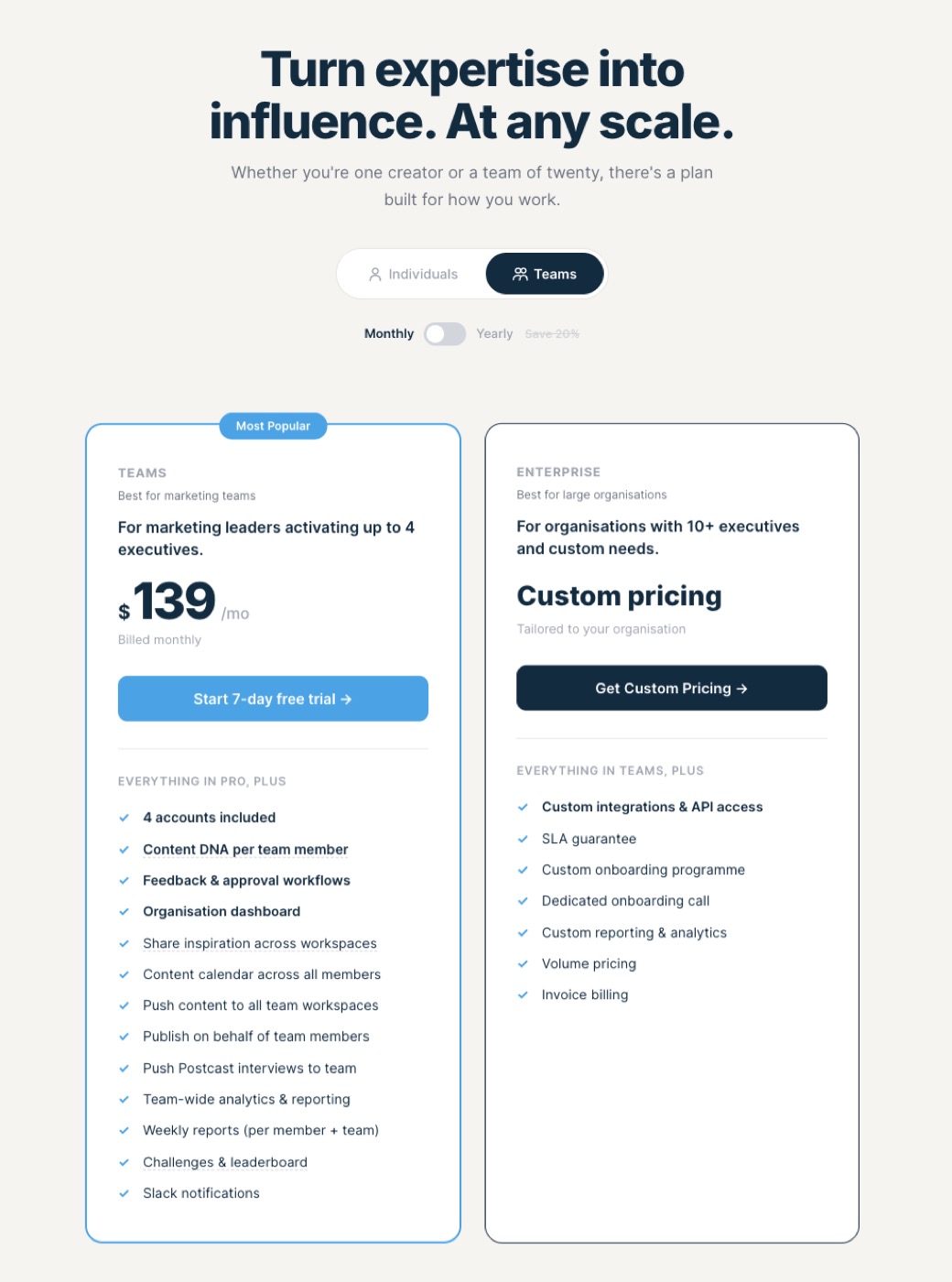
Supergrow pricing
Pros
- +Cheaper entry point at $19/mo Starter for solo creators
- +Built-in carousel maker and infographic generator out of the box
- +Large library of viral-post categories and swipe files for content inspiration
- +Auto-pilot post generator for hands-off scheduling
- +Supergrow MCP integration on the Pro plan ($39/mo) for Claude / ChatGPT workflows
- +Postcast AI interviews — generate posts from a recorded voice memo
Cons
- −Built for content production, not pipeline — no warm-lead capture or ICP filtering on engagers
- −AI drafts are competent but lean generic; no per-person voice presets
- −Team plan jumps to $139/mo for only 4 accounts (vs $39/user/mo on Postbeam, no minimum lock-in past 2 users)
- −Leaderboard-style team motivation, which rarely changes the behavior of the 80% who don't post
- −Carousel/infographic outputs feel template-driven; not a substitute for a real designer or Figma
- −No team-wide warm-lead visibility or shared hot-lead pipeline
Feature-by-Feature Comparison
1. Core philosophy
Supergrow is built for the moment before a post is published. The whole product surface — Post Generator, Idea Generator, Carousel Maker, Viral Posts, Swipe Files, Auto-pilot — is geared toward producing more, better content, faster. It's a creator OS.
Postbeam is built for the moment after a post is published. The drafting and scheduling layer exists, but the product's real job is what happens when engagement comes in: surface the ICP-matched engagers, draft the opening message, route hot leads to the right teammate. It's a pipeline tool.
Verdict: Different categories. If posting more is the bottleneck, Supergrow. If converting engagement to conversations is the bottleneck, Postbeam.
2. AI writing quality
Both products ship an AI post generator. Supergrow's is the larger feature surface — viral-post categories, swipe files, idea generation, podcast-style voice interviews. The drafts read fine. The trade-off is they read “like AI drafts” — competent but generic, similar in cadence across users. That's fine for solo creators who edit heavily.
Postbeam's AI is per-teammate. The first time a teammate publishes through Postbeam, the system learns their voice; every subsequent draft is rewritten to sound like them. For team programs, this is the single biggest lever. The #1 reason employees stop posting through advocacy or social selling tools is that the drafts don't sound like them.
Verdict: Supergrow wins on AI feature surface. Postbeam wins on voice fidelity for multi-person team use.
3. What happens after a post goes live
Supergrow shows you the metrics: likes, comments, reach, per post and over time. Useful for the “am I posting consistently?” question. Not useful for the “who should I message?” question.
Postbeam shows you the engagers themselves, filtered against your ICP, with the highest-intent ones surfaced first. A pre-drafted opening message references the post they engaged with so the outreach feels contextual instead of cold. This is the difference between “your post got 200 likes” and “here are 12 of those 200 who match your ICP — message them with this.”
Verdict: Postbeam wins decisively here. Supergrow doesn't play in this category.
4. Brand and design quality
Worth saying because it's the thing prospects mention unprompted. Supergrow looks like a competent SaaS tool — blue-and-white, dense sidebar, lots of features visible at once. Postbeam looks more considered: tighter typography, a clear visual hierarchy, video testimonials from real customers throughout the marketing site, and a brand voice that reads founder-led instead of template.
Soft factor, real impact. We've had multiple prospects tell us the design quality is what tipped them from Supergrow to Postbeam after evaluating both. It's a proxy for product care.
Verdict: Postbeam, but this is subjective. Click through both marketing sites and decide for yourself.
5. Carousels, infographics, and creator-style production
Supergrow ships a real carousel maker and infographic generator on the Pro plan ($39/mo). For creators whose strategy depends on carousel formats, this is genuinely useful — you stay inside one tool from idea to publish.
Postbeam supports publishing carousels — design them in Figma, Canva, or any PDF tool and Postbeam handles the upload, scheduling, and analytics like any other post. What Postbeam doesn't ship is the generator that builds the slides for you. If carousels are core to your strategy and you want everything in one tool, Supergrow's built-in maker is the right pick. If you already design carousels elsewhere (or you don't use them often), Postbeam covers the publishing side without the extra production layer.
Verdict: Supergrow wins for end-to-end carousel production. Postbeam ties for carousel publishing.
6. Team plans and scaling
Supergrow's Team plan is $139/mo for 4 accounts. Past 4 seats, you're into the Enterprise demo-pricing track. The team features lean toward content production at scale: shared workspaces, approval flows, push content to all members, leaderboard, Slack notifications.
Postbeam's Team plan is $39/user/mo with a 2-user minimum and no upper cap — a 10-person team pays $390/mo with no enterprise sales call. The team features lean toward GTM: shared ICP filters, team-wide hot-lead visibility, approval workflows, insights across team accounts, concierge onboarding.
Verdict: Cheaper at 2-4 seats is Supergrow. Cheaper and more pipeline-oriented at 5+ seats is Postbeam. Depends on team size.
7. Done-for-you and concierge motion
Postbeam ships a Done-For-You tier ($499/mo) where a vetted Postbeam Expert ghostwrites posts in your voice, manages scheduling, and runs the warm-lead follow-up loop. It's for founders who don't want to think about LinkedIn at all but still want pipeline from it.
Supergrow doesn't offer a ghostwriting tier. If you want hands-off LinkedIn through Supergrow, you'd need to hire a freelance writer separately and have them use the tool.
Verdict: Postbeam if you want the operator motion built in.
The real question to ask yourself
Both tools will help you post more on LinkedIn. The variable is what you do with the engagement those posts generate. If the answer is “celebrate it on the team Slack” or “screenshot for the marketing report,” Supergrow is a fine pick and the cheaper entry tier might be exactly right.
If the answer is “turn it into a conversation with a buyer,” you need a tool that closes the loop between content and pipeline. Postbeam's warm-lead view was built around exactly that gap, which is also why we layered an employee advocacy product on top of the social-selling core instead of the other way around.
Postbeam closes the loop. Same drafting, scheduling, and team workflows you'd get from Supergrow, plus warm-lead capture on every post and a pre-drafted opening message for each engager. Content becomes a pipeline tool, not a reach report.
Try Postbeam Free for 7 Days →Who should choose what
If...
You're a solo creator or exec building a personal brand, posting 3-5 times a week, and carousels are core to your strategy
→ Supergrow. Carousel maker, infographic generator, viral-post library, and the $19/mo Starter price all fit the solo creator use case cleanly. Cheaper and more production-focused than Postbeam.
If...
You're a B2B founder or GTM lead who wants LinkedIn to drive pipeline, not just reach
→ Postbeam. Warm-lead capture, ICP filtering, pre-drafted outreach, per-teammate brand voice, and US-hours support. Built for the team that's selling on LinkedIn, not just posting on it.
If...
You're a marketing team of 5+ running a multi-person LinkedIn program with sales follow-up
→ Postbeam. $39/user/mo with no seat cap, shared ICP filters, team hot-lead visibility, approval workflows. Supergrow's Teams plan caps at 4 seats and is content-production-focused without the pipeline layer.
If...
You're an agency producing high content volume for client personal brands
→ Either. Supergrow if the deliverable is 'we ghostwrote 12 posts and 4 carousels.' Postbeam if the deliverable is 'we ghostwrote the posts and surfaced these 23 warm leads to your sales team.' Most modern agencies are moving toward the second motion.
If...
You're a founder who wants LinkedIn but doesn't want to run it yourself
→ Postbeam (Done For You). Postbeam's $499/mo Done-For-You tier pairs you with a vetted Expert who ghostwrites in your voice and runs the warm-lead loop. Supergrow doesn't offer a managed motion.
Frequently Asked Questions
Are Postbeam and Supergrow really competitors?+
Which one is cheaper?+
Does Supergrow have warm lead detection?+
Can I post carousels with Postbeam?+
Can I use both Postbeam and Supergrow together?+
Is Postbeam's AI writing better than Supergrow's?+
What's the best alternative to Supergrow if I want creator-style production but better quality?+
Related Articles
Supergrow vs Taplio: Which Is Better? →
Head-to-head of two AI-first LinkedIn content tools — pricing, features, real reviews.
Best Taplio Alternatives 2026 →
6 Taplio alternatives compared (Supergrow, AuthoredUp, Postbeam, Buffer, and more).
AuthoredUp vs Taplio: Which to Use →
Writing tool vs all-in-one. Which one fits your workflow.
Postbeam vs Vulse: Which LinkedIn Tool to Use →
Social selling vs employee advocacy — different categories explained.
Best LinkedIn Scheduling Tools (2026) →
Compare the top schedulers for solo, agency, and team workflows.
What Is Social Selling? (2026 Guide) →
Why pipeline-from-content is becoming the default GTM motion in B2B.
Supergrow vs Postbeam (Comparison Page) →
The side-by-side feature comparison on the compare hub.
Stop Reporting Reach. Start Producing Pipeline.
Supergrow helps you post more. Postbeam helps you post and turn every post into warm leads. Start your 7-day free trial.
Start Your 7-Day Free Trial →