

At a glance
Buffer is one of the original social schedulers, with a clean calendar across LinkedIn, X, Facebook, Instagram, TikTok, and Pinterest. Postbeam is LinkedIn-only by design: every feature is built for B2B pipeline, not multi-network distribution.
What is Postbeam?
Postbeam is the LinkedIn-native pipeline platform built for B2B teams. Marketers draft posts in each teammate's voice, every scheduled post surfaces ICP-matched engagers as warm leads, and admins can scale advocacy across the team without spreadsheets. It publishes through LinkedIn's official partner APIs, so no Chrome extensions or automation flags ever touch your team's profiles.
Why Postbeam stands out
- Warm lead detection on every post: ICP-matched engagers get surfaced in-context, with the first outbound message pre-drafted.
- Per-person brand voice presets so every teammate sounds like themselves instead of one generic AI draft.
- Drafts-for-teammates workflow: admins write posts, teammates edit and publish as themselves in one click. No spreadsheets, no Slack chasing.
- Public, predictable pricing (rare in this category) with a real free trial so you can pilot before talking to sales.
- Claude and ChatGPT integration: pull your LinkedIn engagement data straight into the tools your team already uses.
- LinkedIn-safe publishing through official partner APIs.
What is Buffer?
Buffer is one of the original social schedulers and has stayed true to that simplicity. If you post across several networks and want a clean calendar without a steep learning curve, it still holds up in 2026.
Buffer is a multi-network social scheduler with a free tier, a clean calendar UX, and solid mobile apps. It covers LinkedIn, X, Facebook, Instagram, TikTok, and Pinterest, with per-channel pricing that rewards solo creators.
Why Buffer stands out
- Free plan covers up to three channels with 10 scheduled posts per channel, which is plenty for solo use.
- One of the lightest onboarding experiences in the category; you can draft your first post in under two minutes.
- Solid mobile apps if you draft on the go instead of at a desk.
- Per-channel pricing is friendly for creators on 3 to 5 networks.
Feature-by-feature comparison
| Feature | Postbeam | Buffer |
|---|---|---|
| Starting price | $49/mo solo | $0 (3 channels) |
| LinkedIn-native (carousels, polls, docs) | Yes | Basic |
| Warm lead detection | Yes | No |
| Multi-network (X, Insta, FB, etc.) | LinkedIn only | 6+ networks |
| Team scaling (cost) | $39/user/mo | Per channel pricing scales fast |
| Employee advocacy workflow | Built-in | No |
| Per-person brand voice AI | Yes | No |
| Free plan | 7-day trial | Yes (limited) |
Pricing
Postbeam
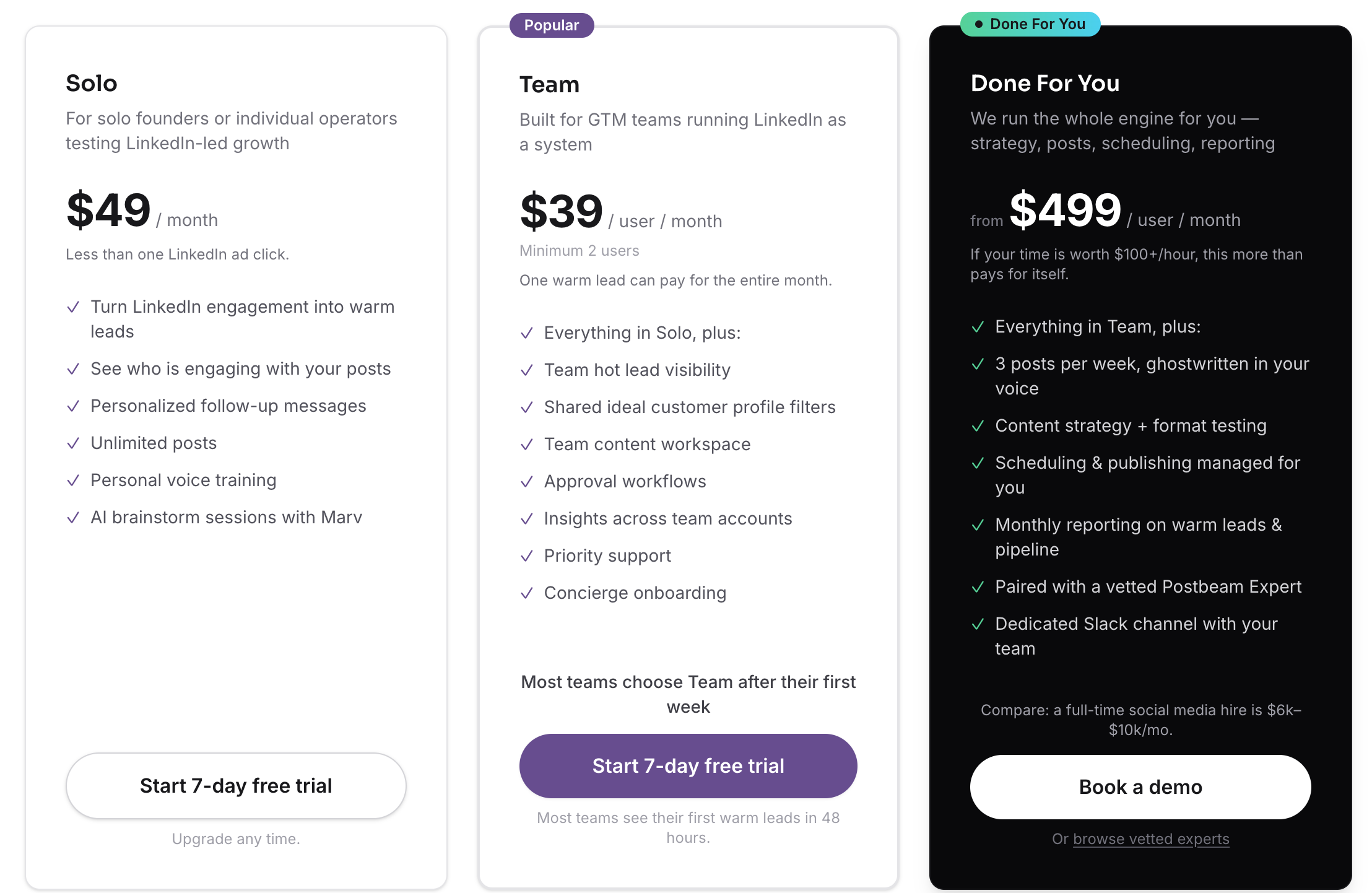
Solo $49/mo · Team $39/user/mo · Done For You $499/user/mo
Solo is $49/mo for individual founders. Team is $39/user/mo with a 2-user minimum (one warm lead a month often pays for the entire plan). Done For You is $499/user/mo and bundles strategy, posts, scheduling, and reporting with a vetted Postbeam Expert. Free trial is 7 days.
Buffer
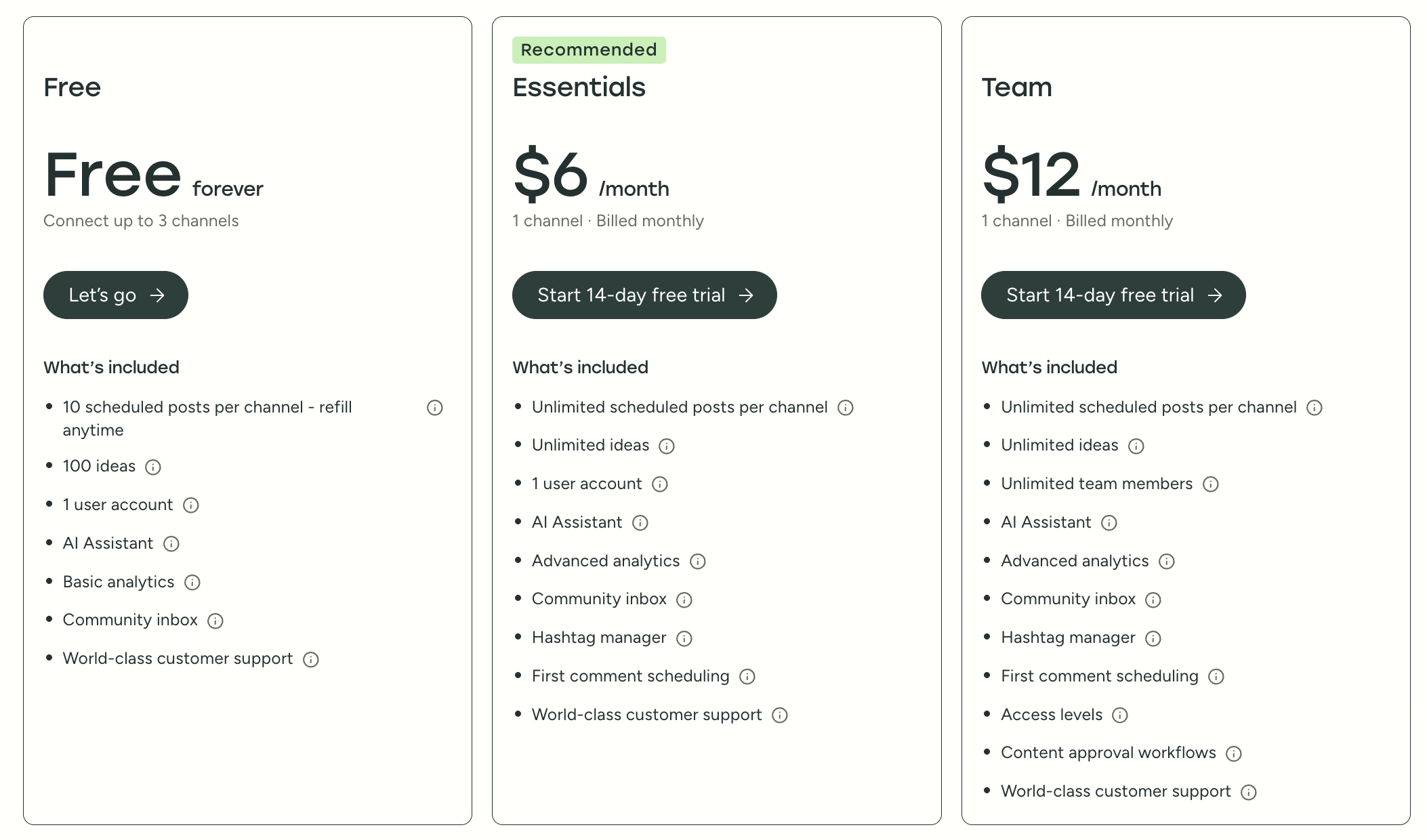
Free · Essentials $6/mo · Team $12/mo (per channel)
Free forever plan connects up to 3 channels with 10 scheduled posts per channel. Essentials is $6/mo (1 channel, billed monthly) and unlocks unlimited scheduling, AI assistant, and analytics. Team is $12/mo (1 channel, billed monthly) and adds unlimited team members, approval workflows, and access levels.
Pros and cons
Postbeam
- +Transparent, public pricing with a self-serve free trial
- +Warm lead detection on every post (the differentiator)
- +LinkedIn-native, not a retrofitted multi-network suite
- +Per-person brand voice for team content programs
- +Scales cheaper than any enterprise advocacy or social suite
- +Official LinkedIn partner APIs (zero account flagging risk)
- −LinkedIn-first by design, not a 12-network corporate comms platform
- −Newer product, so the template library is smaller than legacy tools
Buffer
- +Genuinely useful free plan
- +Clean, beginner-friendly UX
- +Good multi-network coverage
- +Fair per-channel pricing for solos
- −LinkedIn-specific formats (carousels, documents, tags) feel like an afterthought
- −No warm lead detection, ICP filtering, or employee advocacy workflow
- −Per-channel pricing gets expensive fast once you add teammates
Where Postbeam wins
- +Native support for LinkedIn-specific formats (carousels, document posts, polls) that Buffer treats as an afterthought.
- +Warm lead detection turns every post into pipeline, not just a published artifact.
- +Team pricing stays predictable; Buffer's per-channel pricing balloons quickly with multiple accounts.
- +Built-in employee advocacy means founders, SDRs, and marketers coordinate without spreadsheets.
Where Buffer makes more sense
- →Free plan covers 3 channels, perfect for solo creators just getting started.
- →Genuinely good multi-network coverage if LinkedIn is one of many channels.
- →Lowest entry price on the market for cross-network scheduling.
- →Polished mobile apps for on-the-go drafting.
The verdict
Buffer is the right call when LinkedIn is one of many channels and simplicity matters more than depth. If LinkedIn is your primary go-to-market channel, you'll outgrow Buffer in months. Postbeam is built for the team that's serious about LinkedIn pipeline.