


Taplio has earned its reputation as one of the go-to tools for LinkedIn personal branding. The inspiration library is deep, the AI writer is tuned for LinkedIn hooks, and it covers carousels, polls, and document posts out of the box. But it's not the right fit for everyone.
We tested six of the most popular Taplio alternatives in 2026, from LinkedIn-native team platforms to analytics-only tools to multi-network generalists. For each, we looked at what actually matters when you're running a LinkedIn cadence: how easy it is to use, whether it handles multiple people on one account without a headache, how deep the analytics go, and how the pricing scales as you add teammates.
Here's what to use in 2026, who each one is actually for, and what you'll give up if you pick the wrong one.
Prefer to watch? Here's the video version of this comparison:
TL;DR: Our 6 picks at a glance
- 1. Postbeam:best for founders and teams of B2B companies on LinkedIn.
- 2. AuthoredUp:best for solo writers who want the best LinkedIn post editor on the market.
- 3. Typegrow:best for creators who post carousels and want a built-in slide creator.
- 4. Supergrow:best for solopreneurs who rely on AI to generate post ideas.
- 5. Shield App:best for data-driven creators and teams who need deep LinkedIn analytics.
- 6. Buffer:best for users managing LinkedIn alongside other social platforms.
Why people look for Taplio alternatives
Before we get into the list, here's why users most often start shopping:
💰 Pricing
Taplio Starter is $39/mo, Growth is $69/mo, and Pro is $199/mo. For a team, that scales badly. Alternatives like Postbeam ($39/user on Team) and Supergrow ($19/mo) offer similar features at a lower effective price.
👥 Team Features
Taplio is designed for solo creators. If you're an agency, a GTM team, or a founder-led startup with 3+ teammates posting, you'll quickly outgrow the single-user workflow.
📊 Analytics Depth
Taplio's analytics cover the basics. Power users often want earned media value, multi-profile tracking, and client-ready reports, which is why Shield App exists.
🎯 Pipeline Signal
Taplio shows you who engaged, but doesn't filter engagers by ICP or intent. Postbeam is the only tool in this list that turns post engagement into a ranked warm-lead list.
The 6 best Taplio alternatives in 2026
1. Postbeam - best for founders and teams of B2B companies on LinkedIn
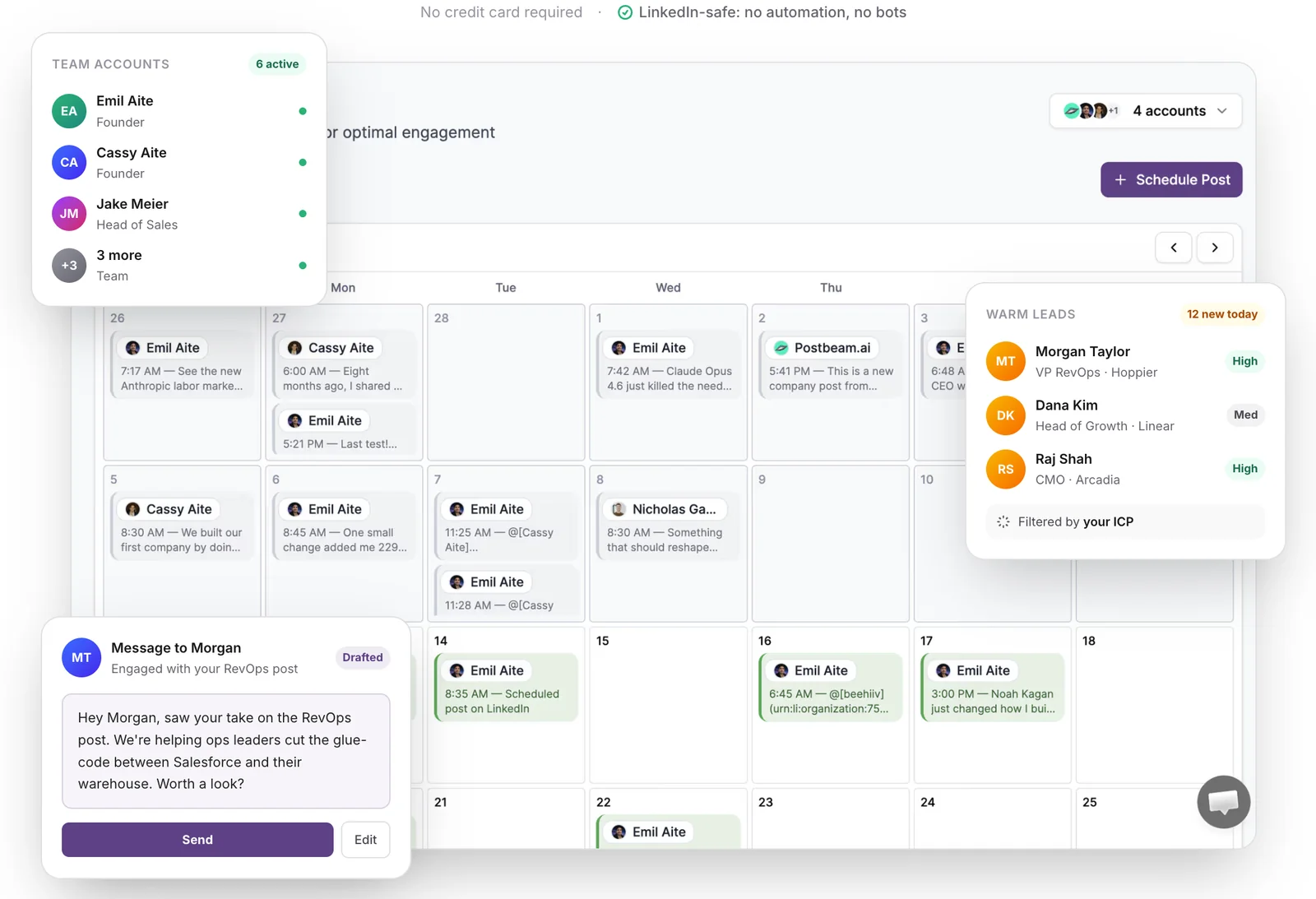
Postbeam is the LinkedIn-native platform built for GTM teams and agencies who've outgrown Taplio. It covers everything Taplio does (scheduling, analytics, AI writing), then adds the pieces Taplio never shipped: real multi-account workflows, employee advocacy, and warm lead detection wired into every post.
What is Postbeam?
Postbeam is an AI-powered LinkedIn scheduler for teams. You plan posts on a shared calendar, draft in a brand voice your teammates actually sound like, and see which engagers on every post match your ICP. It publishes through LinkedIn's official partner APIs, so there are no Chrome extensions or automation flags touching your account.
Why Postbeam stands out
- Multi-account scheduling and employee advocacy live in one workspace, so a founder, an SDR, and a CMO can coordinate without juggling tools.
- Warm lead detection on every post: Postbeam filters engagers by ICP and ranks them by intent, right inside the post that earned them.
- AI writer trained on high-performing LinkedIn posts with brand-voice presets, so teammates sound like themselves instead of like every other AI draft.
- Team pricing scales ($39/user/mo on Team) instead of punishing headcount like Taplio Pro ($199/mo for one seat).
- Safe publishing through LinkedIn's official partner APIs, no extensions, no automation flags.
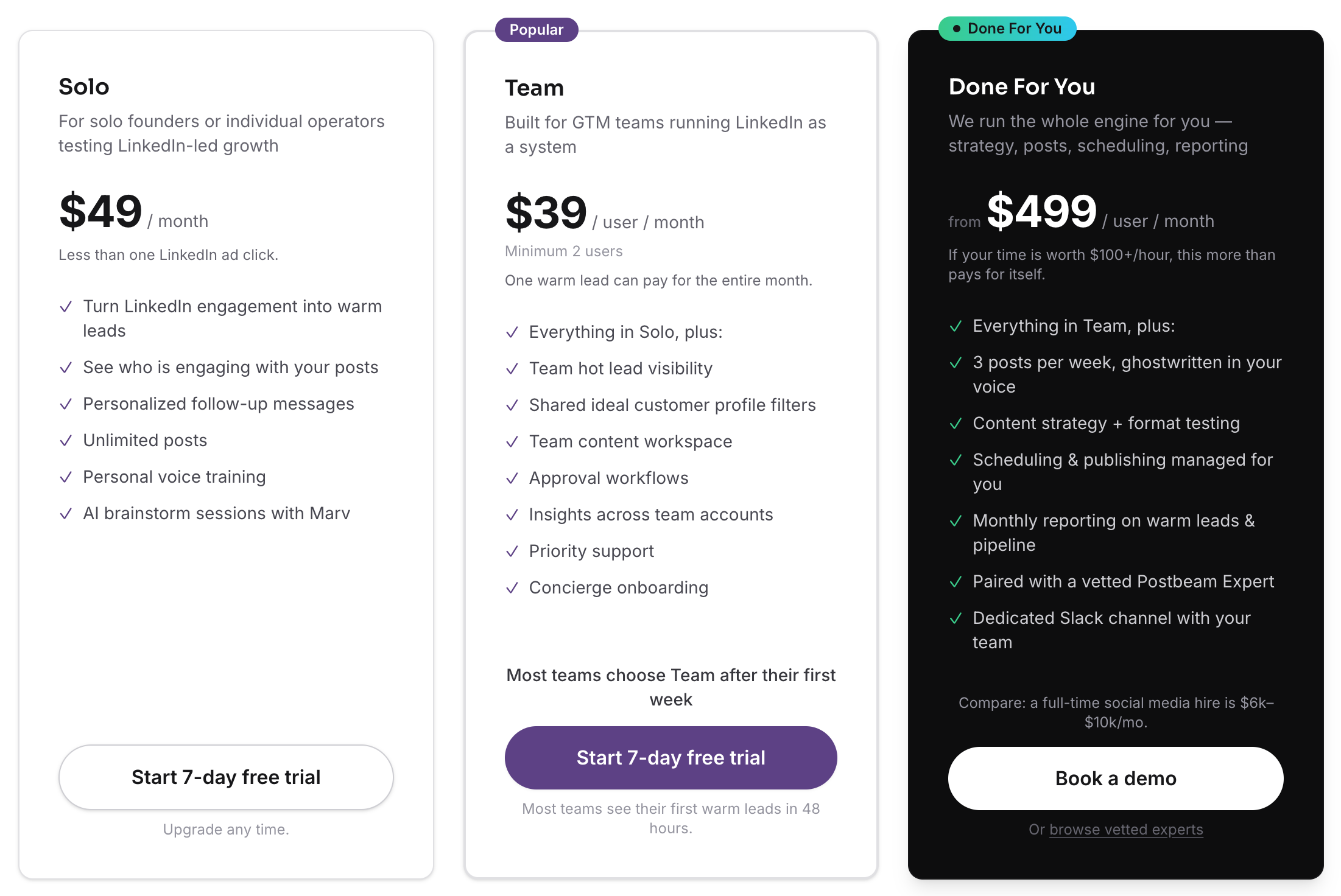
Postbeam pricing
Solo $49/mo · Team $39/user/mo · Done For You $499/mo
Solo is $49/mo for individual founders. Team is $39/user/mo with a 2-user minimum, and one warm lead can pay for the whole month. Done For You is $499/mo and bundles strategy, posts, scheduling, and reporting with a vetted Postbeam Expert. Free trial is 7 days.
Postbeam in action
Don't take our word for it
TryThisAI (438K subscribers) independently tested Postbeam as a Taplio alternative for a week - turning LinkedIn posts into actual leads - and published the honest breakdown:
✅ Pros
- +LinkedIn-native and built for teams out of the box
- +Warm lead detection and ICP filtering on every post
- +Brand voice presets for consistent tone across the team
- +Safe publishing (official LinkedIn partner APIs)
- +Team pricing stays flat instead of jumping to $199+ per seat
❌ Cons
- −LinkedIn-first by design; not a multi-network social suite
- −Newer product, so the template library is smaller than Taplio's
Who is Postbeam best for?
If LinkedIn is your primary go-to-market channel, Postbeam is the direct replacement for Taplio built for how teams actually sell. Best fit for founder-led startups, GTM teams, and agencies who want scheduling, advocacy, and pipeline signal in one product.
2. AuthoredUp - best for solo writers who want the best LinkedIn post editor on the market
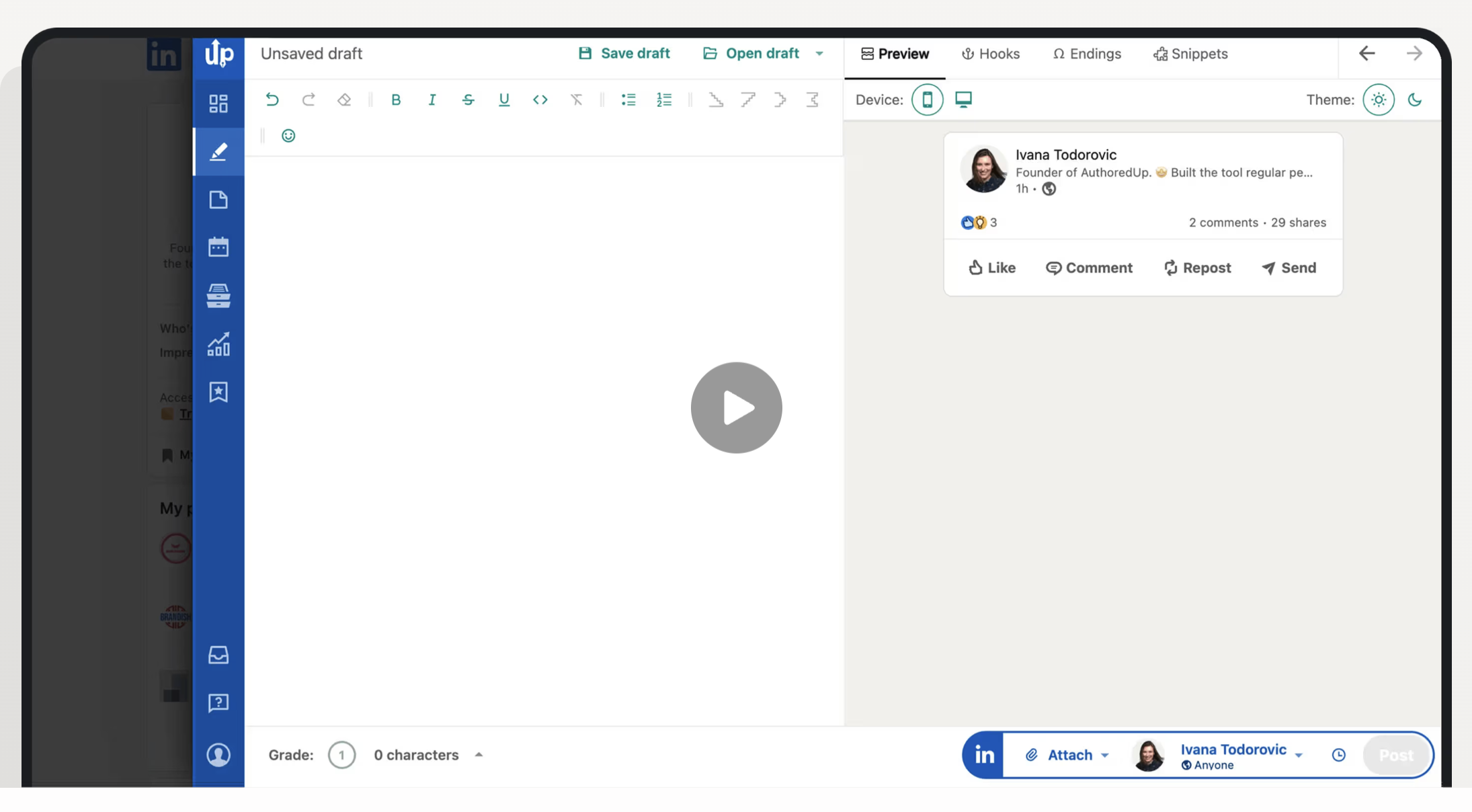
AuthoredUp is a Chrome extension that upgrades LinkedIn's native composer. It's not a full scheduler like Taplio (there's no AI content library, no CRM, no auto-DMs), but for writers who care about formatting and previews, it's the sharpest tool in the category.
What is AuthoredUp?
AuthoredUp is a LinkedIn writing and formatting extension. It adds desktop and mobile post previews, bold/italic/underline formatting, 300+ hooks and endings, snippet shortcuts, 1-click post reuse, and content analytics, all without leaving LinkedIn.
Why AuthoredUp stands out
- Best-in-class desktop and mobile previews before you publish.
- Rich formatting (bold, italic, underline, bullets) inside LinkedIn's composer.
- 300+ hooks and post-ending templates to speed up drafting.
- Content analytics at the profile level, with a Business plan for multi-profile teams.
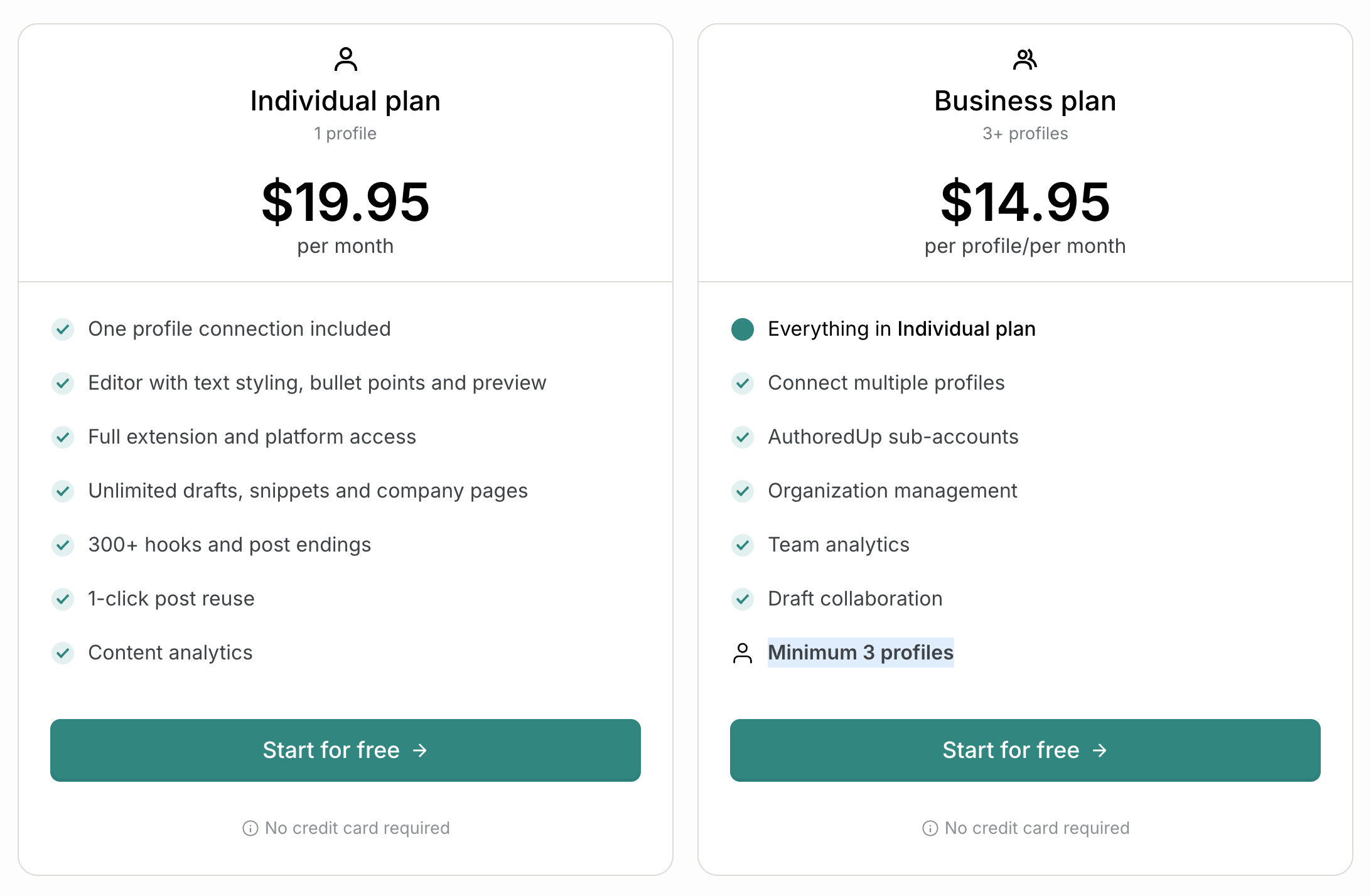
AuthoredUp pricing
Individual $19.95/mo · Business $14.95/profile/mo (3+ profiles)
Individual is $19.95/mo for one profile with text styling, bullet points, preview, 300+ hooks and endings, 1-click post reuse, and content analytics. Business is $14.95/profile/mo with a 3-profile minimum and adds multi-profile connections, sub-accounts, organization management, team analytics, and draft collaboration.
AuthoredUp in action
✅ Pros
- +Best LinkedIn previews and formatting in the category
- +Massive hook and snippet library
- +Cheap entry price compared to full schedulers
❌ Cons
- −Chrome extension only, not a standalone scheduler
- −No AI content library, auto-DMs, or CRM like Taplio
- −No warm lead detection or advocacy workflow
Who is AuthoredUp best for?
AuthoredUp is the right pick if your problem with Taplio is writing, not scheduling. Not a replacement for a real scheduling platform, but a strong add-on for LinkedIn writers.
3. Typegrow - best for creators who post carousels and want a built-in slide creator
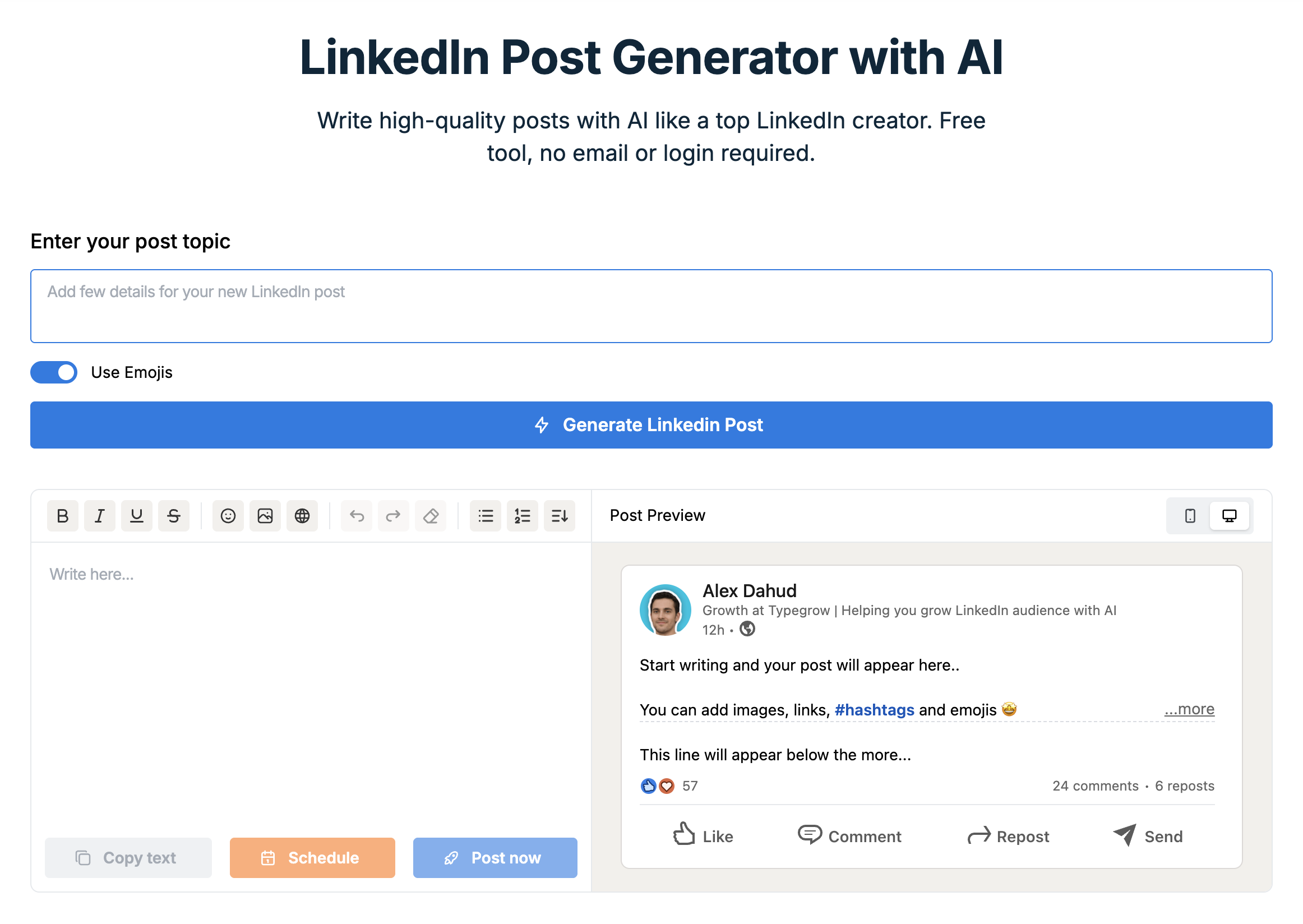
Typegrow is the LinkedIn tool for creators who post carousels. If your weekly cadence leans on document posts and you're tired of bouncing between Canva and Taplio, Typegrow bundles scheduling, AI ideation, and a native carousel creator into one seat.
What is Typegrow?
Typegrow is a LinkedIn scheduler with a built-in carousel/slide creator, AI post generator, post previews, and engagement features. It's positioned at a lower price point than Taplio with a heavier emphasis on visual content.
Why Typegrow stands out
- Built-in carousel and slide creator, no Canva round-trip required.
- AI post generator with live preview and schedule/post-now controls.
- Cheap annual pricing: $20/seat/month when billed yearly.
- Simple interface focused on ship-now creators.
Typegrow pricing
Monthly $29/seat/mo · Annual $20/seat/mo (save 30%)
Billed monthly is $29/seat/month. Billed annually drops to $20/seat/month ($240/year) and saves 30%. Free plan and free trial available; no credit card required to start.

Typegrow in action
✅ Pros
- +Built-in carousel creator saves a separate design tool
- +Cheaper than Taplio Starter on annual billing
- +Clean, single-surface workflow
❌ Cons
- −Engagement-pod style features can sit close to LinkedIn's TOS line
- −No real team, multi-account, or advocacy workflow
- −Smaller analytics and CRM footprint than Taplio or Postbeam
Who is Typegrow best for?
Typegrow is a fit if carousels are your main content format and you want scheduling plus design in one seat. For team or pipeline workflows, you'll outgrow it quickly.
4. Supergrow - best for solopreneurs who rely on AI to generate post ideas
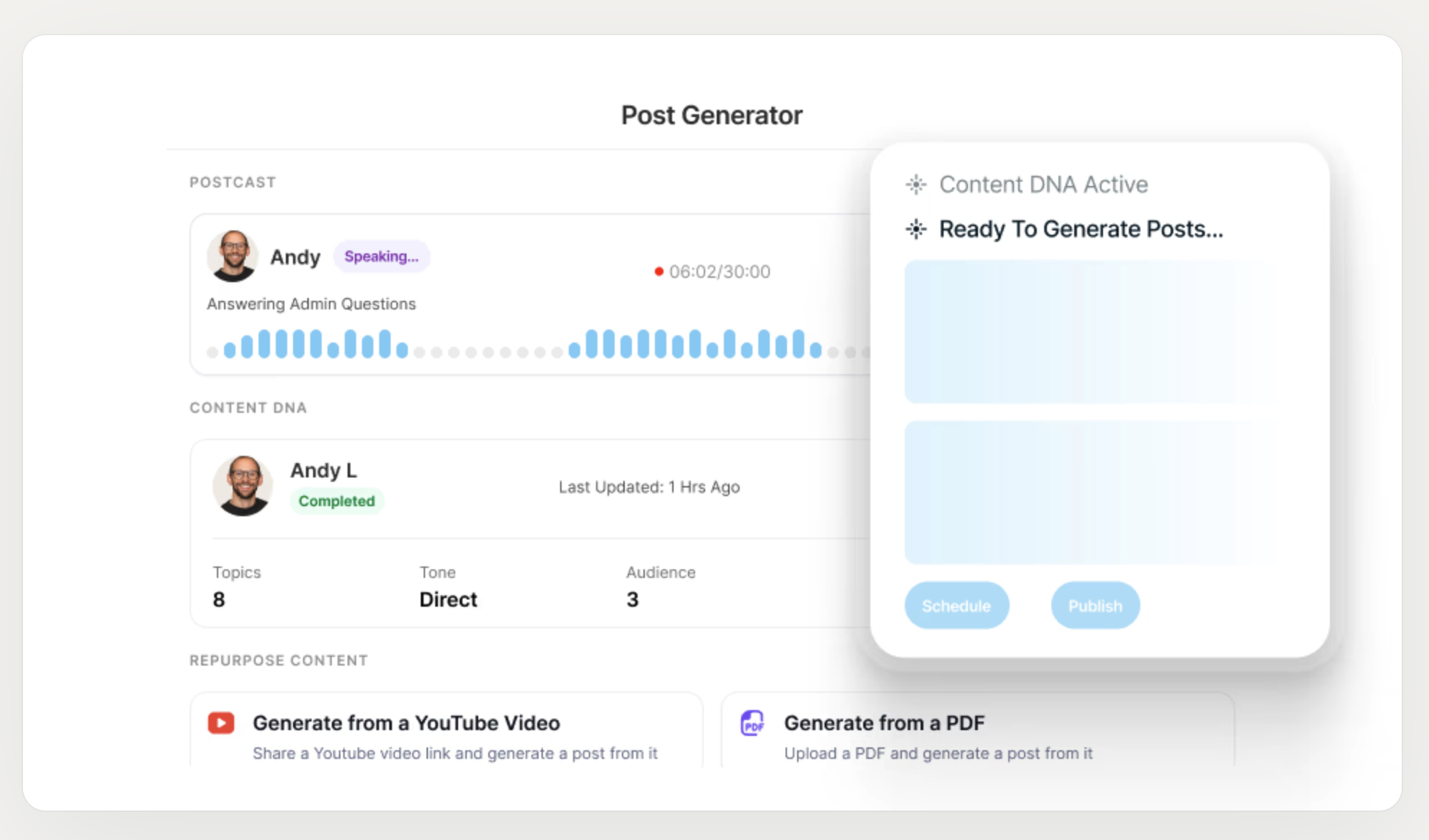
Supergrow is the AI-first LinkedIn tool. Where Taplio leans on a post-idea library, Supergrow leans on AI generation: Content DNA, Postcast (AI interviews), carousel maker, and profile analytics, all at a lower starting price.
What is Supergrow?
Supergrow is a LinkedIn-first scheduler with AI ideation, Content DNA for voice matching, post repurposing from YouTube and PDFs, a carousel maker, and profile analytics. It's aimed at solo creators and freelancers who want the essentials without enterprise pricing.
Why Supergrow stands out
- AI post generator with Content DNA to match your writing voice.
- Postcast: AI interview sessions that turn into post drafts.
- Post repurposing from YouTube videos, articles, and PDFs.
- Carousel maker and infographic generator included on Pro.
Supergrow pricing
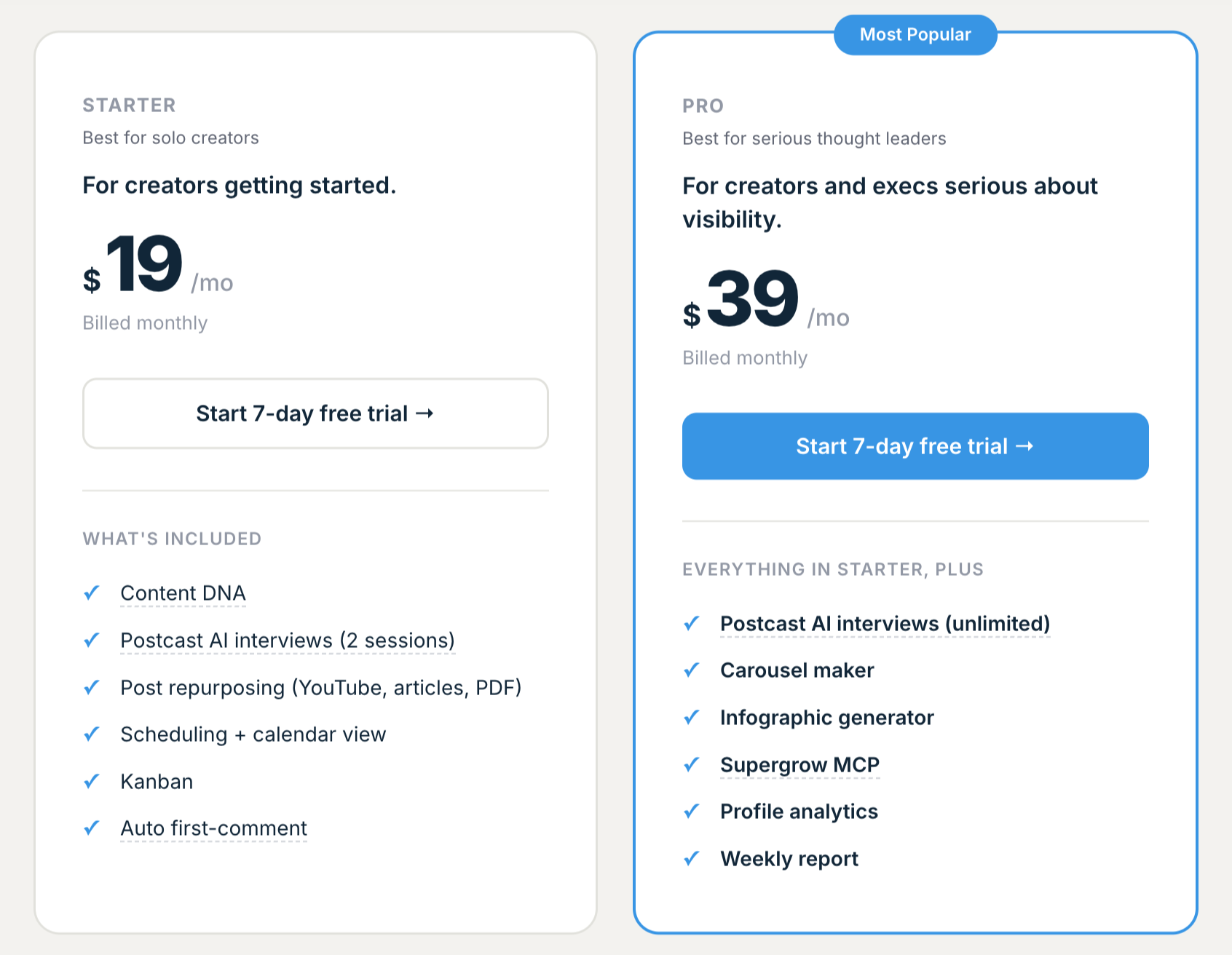
Starter $19/mo · Pro $39/mo (Most Popular)
Starter is $19/mo billed monthly with Content DNA, 2 Postcast AI interview sessions, post repurposing, scheduling + calendar view, Kanban, and auto first-comment. Pro is $39/mo (Most Popular) and adds unlimited Postcast, carousel maker, infographic generator, Supergrow MCP, profile analytics, and weekly reports.
Supergrow in action
✅ Pros
- +Strong AI ideation with voice matching
- +Repurpose content from YouTube/PDFs directly
- +Cheapest LinkedIn-native scheduler in this list
❌ Cons
- −AI output can feel generic without editing
- −Team and multi-account features are limited
- −No warm lead detection or pipeline signal
Who is Supergrow best for?
Supergrow is a great Taplio replacement if you rely on AI to draft posts and you're working solo. Step up to Postbeam when you add teammates or need pipeline signal.
5. Shield App - best for data-driven creators and teams who need deep LinkedIn analytics
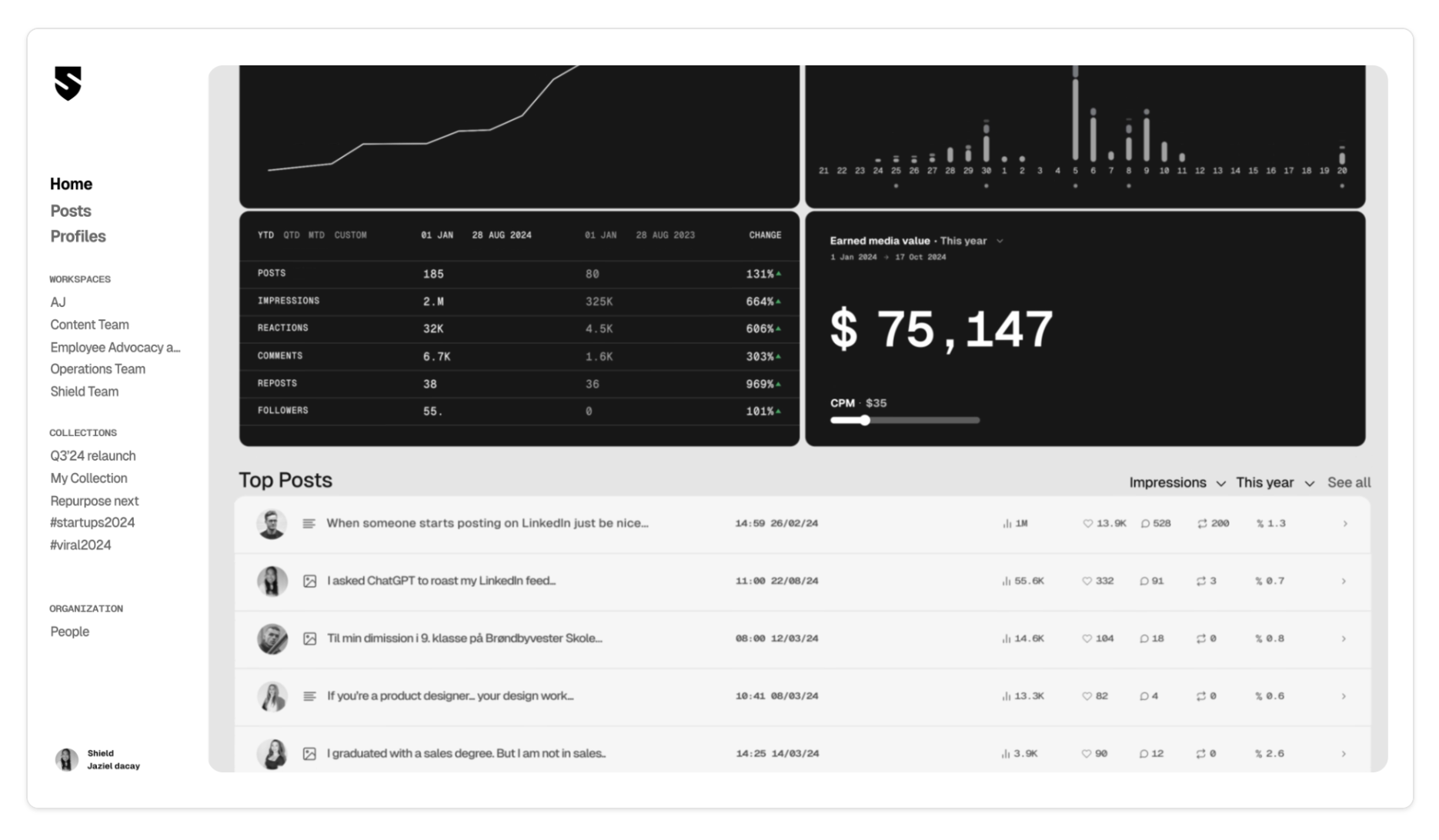
Shield is the LinkedIn analytics tool. It doesn't schedule, doesn't draft, doesn't auto-DM. It just gives you the deepest LinkedIn reporting on the market. Pair it with a scheduler if you want the full stack Taplio tries to be.
What is Shield App?
Shield App is a LinkedIn analytics and reporting dashboard. It tracks impressions, engagement, earned media value, top posts, collections, and team-wide performance across multiple profiles, with exportable reports for agencies and in-house teams.
Why Shield App stands out
- The deepest LinkedIn analytics on the market, far beyond LinkedIn's native insights.
- Earned media value tracking plus impression, reaction, and comment trends.
- Collections for organizing campaigns and team workspaces for agencies.
- Team dashboards and client-ready reports.
Shield App pricing
From $25/profile/mo
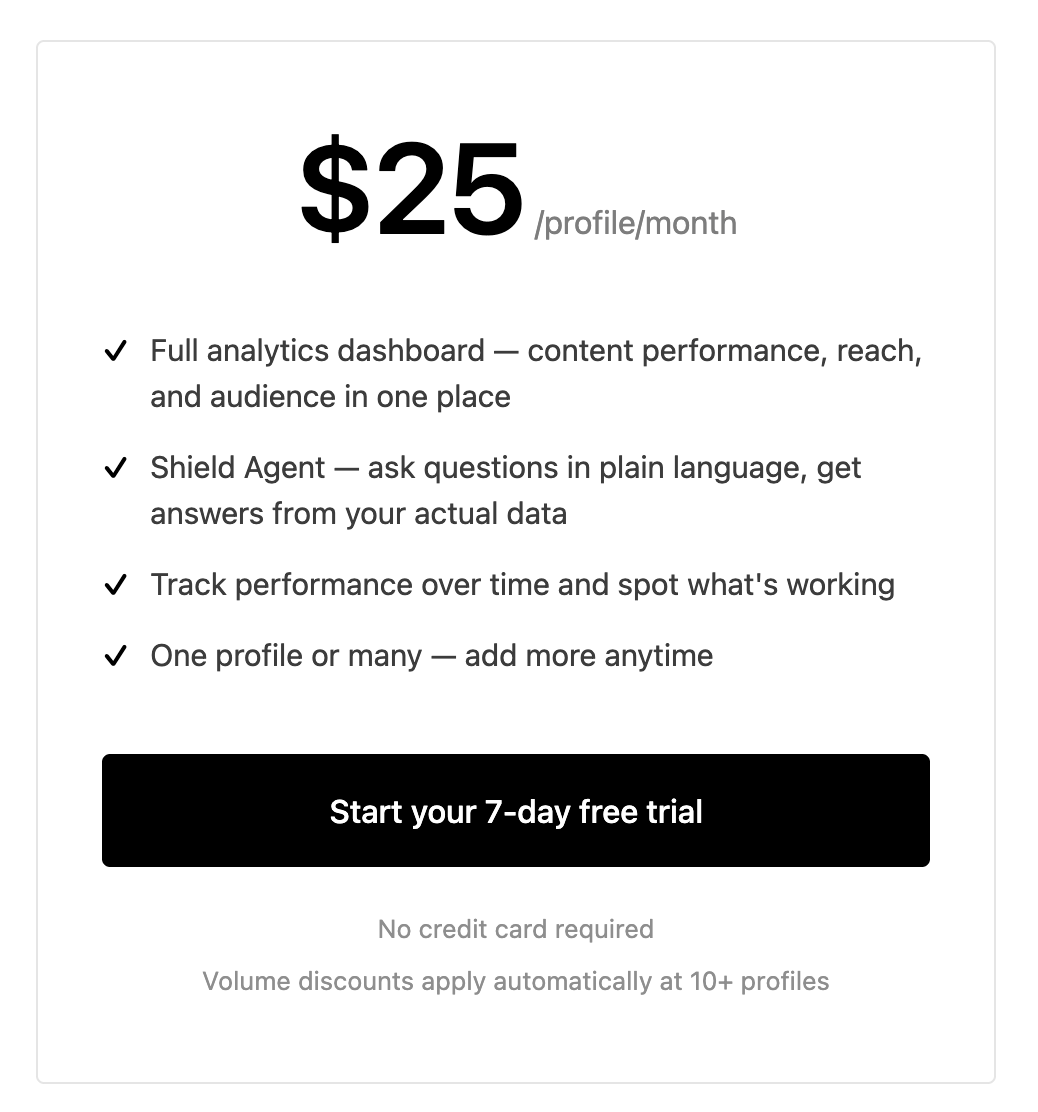
Shield is $25/profile/month with the full analytics dashboard, Shield Agent for plain-language Q&A on your data, performance tracking over time, and one profile or many (add more anytime). 7-day free trial, no credit card required. Volume discounts apply automatically at 10+ profiles.
Shield App in action
✅ Pros
- +The most detailed LinkedIn analytics available
- +Team dashboards and agency-ready reporting
- +Scales across many profiles with volume discounts
❌ Cons
- −Analytics only: no scheduling, no content creation, no AI
- −Expensive if you also need a separate scheduler
- −Overkill if you're not acting on the data
Who is Shield App best for?
Shield is the right pick when your problem with Taplio is analytics depth. Pair it with Postbeam for a complete stack: Postbeam for scheduling and pipeline, Shield for deep reporting.
6. Buffer - best for users managing LinkedIn alongside other social platforms
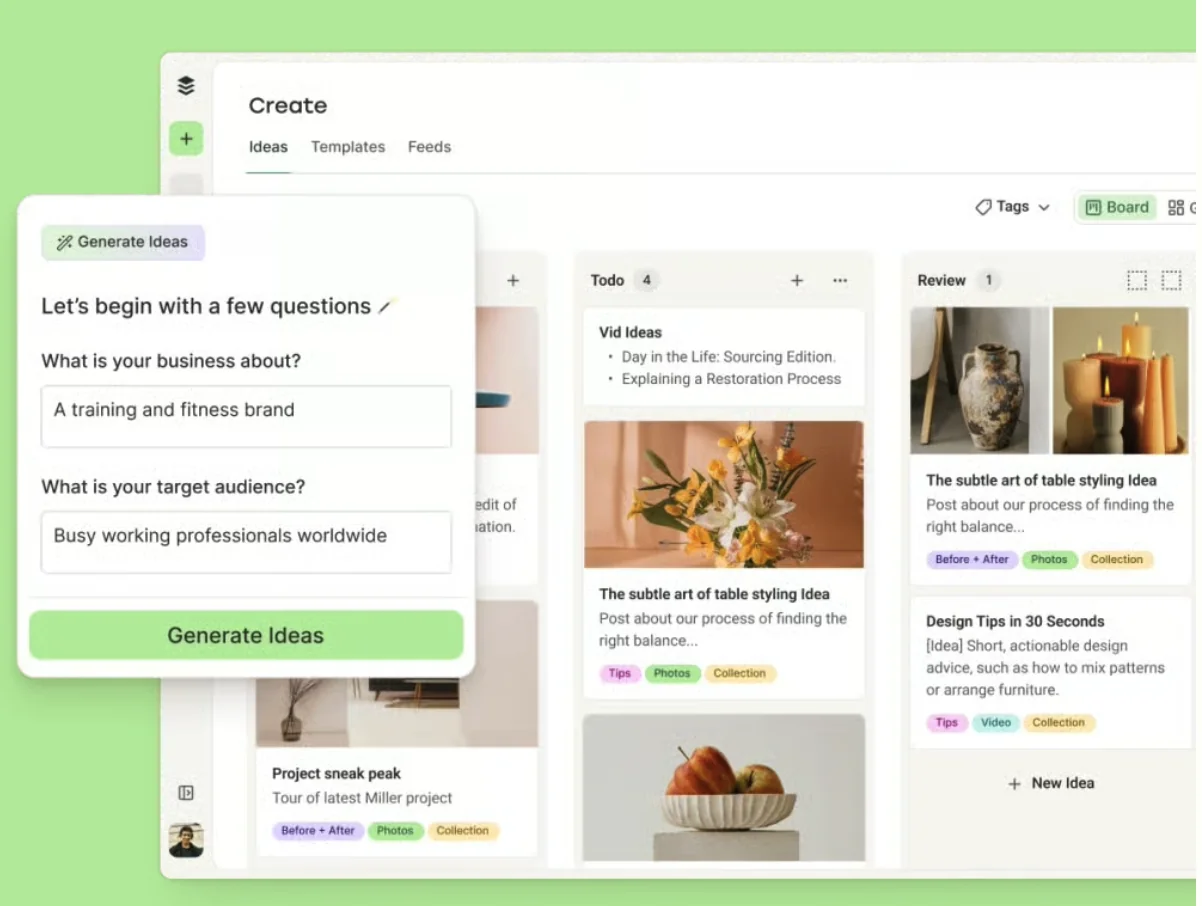
Buffer is the multi-network generalist. If Taplio feels overkill because LinkedIn is just one of five networks you post to, Buffer covers the basics cleanly at a fraction of the price.
What is Buffer?
Buffer is a multi-network social scheduler with a free tier, a clean calendar UX, AI assistant, and solid mobile apps. It covers LinkedIn, X, Facebook, Instagram, TikTok, Bluesky, and Pinterest.
Why Buffer stands out
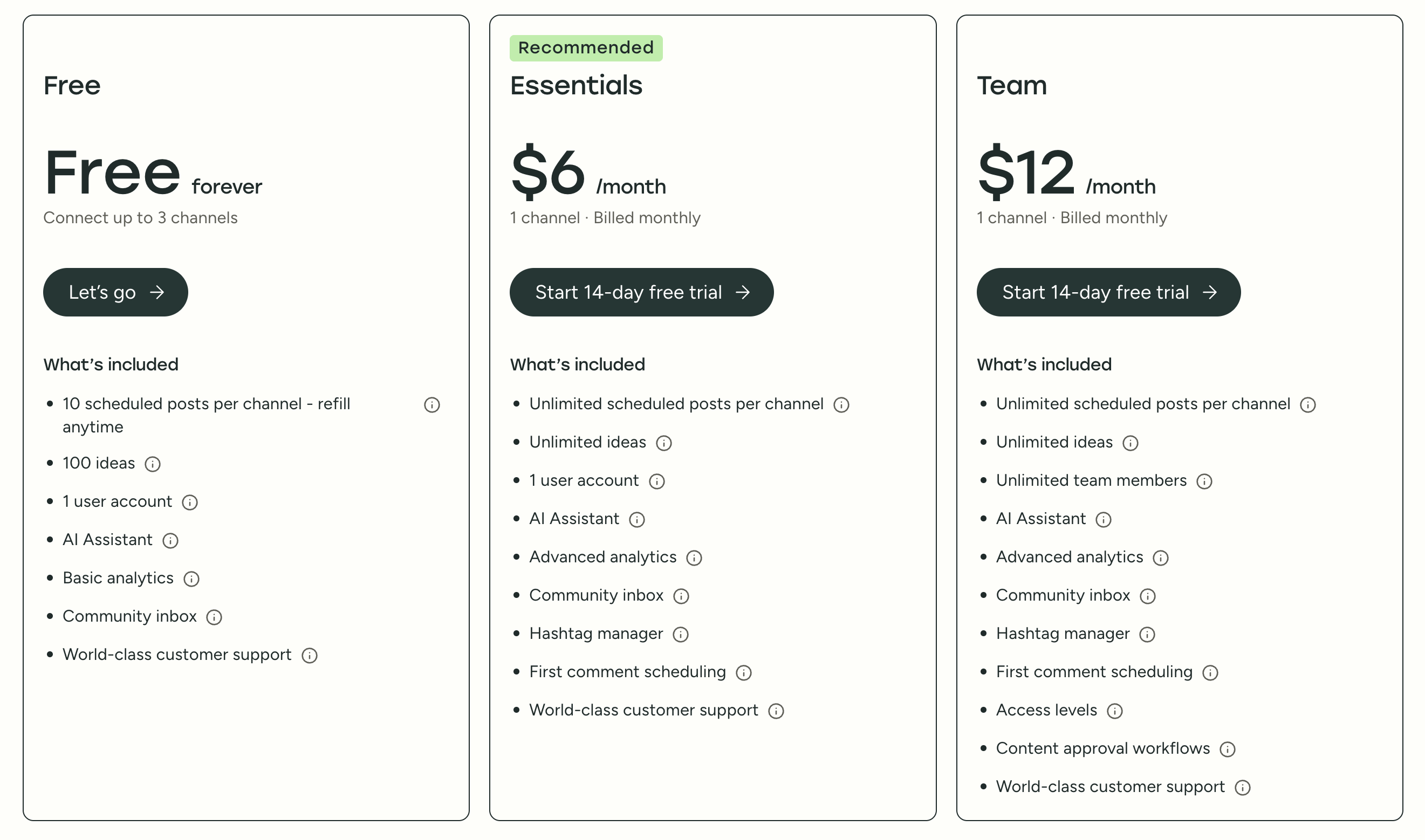
- Free forever plan: 3 channels, 10 scheduled posts per channel, AI assistant.
- Clean, beginner-friendly UX across all networks.
- Per-channel pricing that's friendly for creators on 3–5 networks.
- Solid mobile apps and community inbox on paid plans.
Buffer pricing
Free · Essentials $6/mo · Team $12/mo
Free forever plan covers up to 3 channels with 10 scheduled posts per channel, 100 ideas, 1 user, AI Assistant, basic analytics, and community inbox. Essentials is $6/month/channel (billed monthly) with unlimited scheduling, advanced analytics, community inbox, hashtag manager, and first-comment scheduling. Team is $12/month/channel (billed monthly) and adds unlimited team members, access levels, and content approval workflows.
Buffer in action
✅ Pros
- +Genuinely useful free plan with AI assistant
- +Clean, beginner-friendly UX
- +Good multi-network coverage
❌ Cons
- −LinkedIn-specific features (carousels, documents) feel like an afterthought
- −No warm lead detection, ICP filtering, or advocacy workflow
- −Per-channel pricing adds up fast as you add networks and teammates
Who is Buffer best for?
Buffer is the right call if LinkedIn is one of many networks and you value simplicity. If LinkedIn is your primary pipeline channel, you'll outgrow it quickly.
Quick Comparison Table
| Tool | Starting Price | LinkedIn-Native | Team Features | Warm Leads | Best For |
|---|---|---|---|---|---|
| Postbeam | $39/user/mo (Team) | ✅ Yes | ✅ Yes | ✅ Yes | Teams & Agencies |
| AuthoredUp | $19.95/mo | ✅ Yes (Writing) | ⚠️ Business tier | ❌ No | Solo Writers |
| Typegrow | $20/seat/mo (annual) | ✅ Yes | ❌ No | ❌ No | Carousel Creators |
| Supergrow | $19/mo | ✅ Yes | ❌ No | ❌ No | AI-First Solos |
| Shield App | $25/profile/mo | ✅ Yes (Analytics) | ✅ Yes | ❌ No | Analytics-Focused |
| Buffer | Free / $6/mo | ⚠️ Basic | ✅ Team plan | ❌ No | Multi-Network |
Which Taplio alternative is right for you?
If…
You're a B2B team serious about LinkedIn and want more than just impressions
→ Postbeam. Built for founders and GTM teams who want scheduling, advocacy, and warm-lead signal in one product.
If…
You're a solo writer who wants the best LinkedIn post editor
→ AuthoredUp. Best previews, formatting, and hooks, but pair it with a scheduler if you need one.
If…
You post carousels every week and want a built-in slide creator
→ Typegrow. Carousel creator plus scheduling in one seat, cheaper than Taplio on annual billing.
If…
You rely heavily on AI to generate post ideas and drafts
→ Supergrow. Content DNA, Postcast AI interviews, and post repurposing from YouTube/PDFs at $19/mo.
If…
You need deep analytics and client-ready reports
→ Shield App. The most detailed LinkedIn analytics on the market; pair with Postbeam for the full stack.
If…
You manage LinkedIn alongside 3+ other networks
→ Buffer. Clean multi-network scheduling with a generous free plan to start.
Frequently Asked Questions
Why are people looking for Taplio alternatives?+
Is Taplio worth the price?+
What's the best Taplio alternative for teams?+
What's the cheapest Taplio alternative?+
Can I use multiple Taplio alternatives together?+
Which Taplio alternative has the best AI?+
Free LinkedIn Tools from Postbeam
LinkedIn Post Preview →
See how your post will look before publishing.
LinkedIn Text Formatter →
Add bold, italic, and special formatting to posts.
LinkedIn Character Counter →
Check your post against LinkedIn's 3,000-character limit.
LinkedIn Engagement Calculator →
Benchmark your engagement rate vs. industry averages.
Related Articles
7 Best LinkedIn Scheduling Tools in 2026 →
Full comparison of the top LinkedIn schedulers, ranked.
Supergrow vs Taplio →
Head-to-head comparison of two LinkedIn-native tools.
AuthoredUp vs Taplio →
Which LinkedIn tool is right for your workflow?
Postbeam vs Supergrow: Which to Pick →
Two of the most popular LinkedIn content tools in 2026. Honest breakdown.
50 LinkedIn Post Ideas That Get Engagement →
Never run out of content. 50 proven post ideas with hooks.
Ready to switch from Taplio?
Start your 7-day free trial. AI scheduling, warm lead detection, and team features built for LinkedIn.
Start Your 7-Day Free Trial →