

The short answer
A LinkedIn profile banner is 1584 × 396 pixels (4:1), PNG or JPG, under 8MB. A company page cover is 1128 × 191 pixels. Those are different sizes, so don't reuse the same file for both.
The part almost every guide skips: getting the pixels right still won't stop your banner being cut off. Your profile photo covers the bottom-left, and mobile crops the sides. You need the safe zone, which is exactly what our free template gives you.
Why Your LinkedIn Banner Keeps Getting Cut Off
You export a banner at exactly 1584 × 396, upload it, and half your text is gone. That's not you doing it wrong, it's LinkedIn. Two things eat your design:
- •Your profile photo sits on top of the banner, covering the bottom-left corner. Anything you put there is hidden behind your own face.
- •Desktop and mobile crop differently. Mobile trims the left and right edges, so a design that fills the full width loses its ends.
The fix is a safe zone: the region that survives on both desktop and mobile, and isn't hidden behind your profile photo. Design inside it and your banner looks right everywhere.
Free LinkedIn Banner Template (Canva)
We built this template for our own team and are giving it away. It's already the correct 1584 × 396 canvas, and the teal dotted lines mark the danger zone. Put your profile photo area and nothing else inside them.
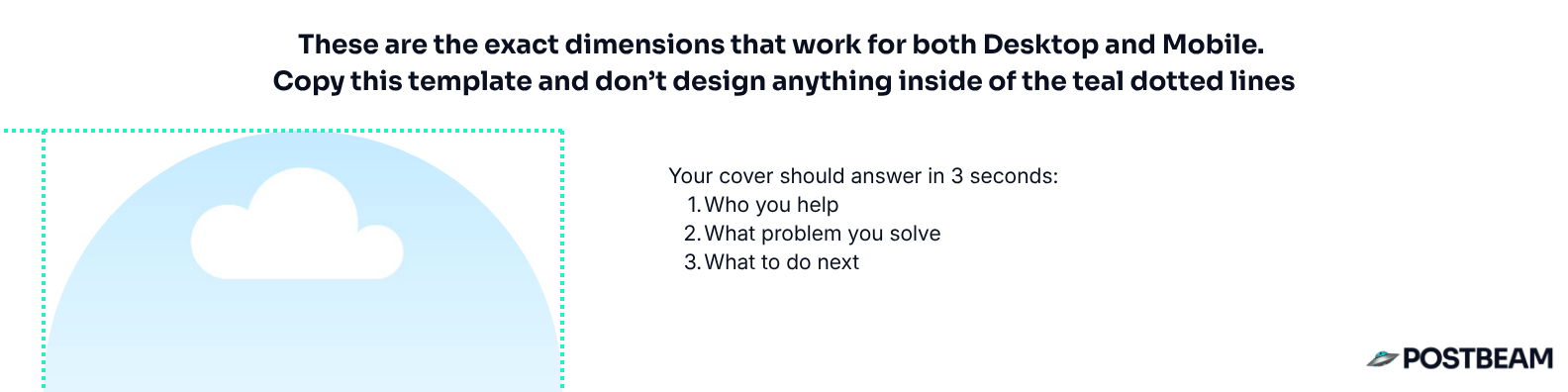
Free LinkedIn banner template
Correct dimensions, safe zones marked, ready to duplicate in Canva. No email required.
Your banner has about three seconds to work. Ours answers three questions: who you help, what problem you solve, and what to do next. That's the whole brief.
What It Looks Like Filled In
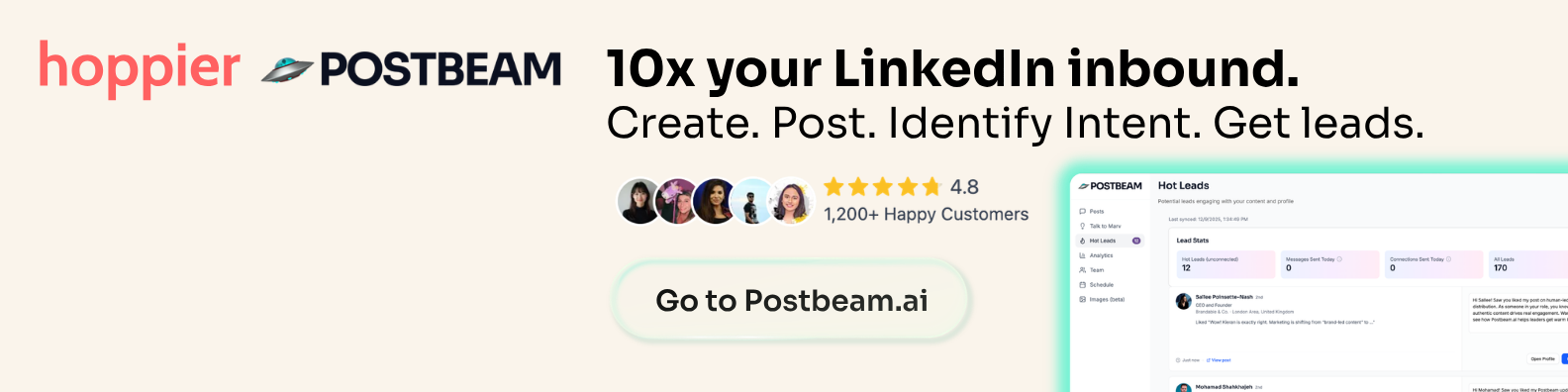
Here's the finished banner we run on our own profiles. Logos top-left, a one-line value proposition, social proof, and a clear next step, all outside the safe zone.
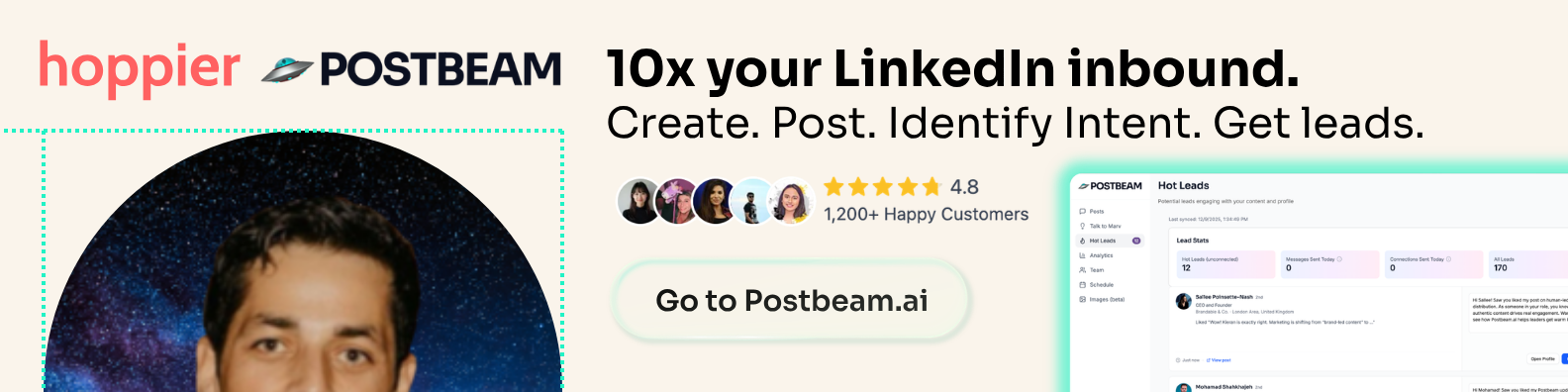
And this is the same banner with the profile photo dropped in, so you can see why the bottom-left has to stay empty:
Every LinkedIn Image Size (2026)
Bookmark this. Every dimension LinkedIn actually uses:
| Image | Size | Notes |
|---|---|---|
| Personal profile banner (cover) | 1584 × 396 px | 4:1 ratio. The one most people mean by 'LinkedIn banner'. |
| Profile photo | 400 × 400 px | Displays as a circle. Min 268 × 268, max 7680 × 4320. |
| Company page banner (cover) | 1128 × 191 px | Different from personal. Don't reuse your profile banner here. |
| Company page logo | 300 × 300 px | Square. Shows at 60 × 60 in the feed. |
| Feed post image (square) | 1200 × 1200 px | 1:1. Safest all-round choice for the feed. |
| Feed post image (portrait) | 1080 × 1350 px | 4:5. Takes the most vertical space in the feed. |
| Feed post image (landscape) | 1200 × 627 px | 1.91:1. Same as a link preview. |
| Carousel / document post | 1080 × 1350 px | 4:5 portrait pages, exported as a PDF. |
| Article cover image | 1920 × 1080 px | 16:9 for LinkedIn articles (not feed posts). |
| Link preview thumbnail | 1200 × 627 px | Pulled from your page's og:image tag. |
Need to check a post image instead? See our full LinkedIn post size guide, or preview a post before you publish with the free LinkedIn Post Preview tool.
How to Add Your Banner to LinkedIn
Duplicate the template
Open the free Canva template and make a copy. The canvas is already 1584 × 396 with the safe zones marked.
Write the three lines
Who you help, what problem you solve, what to do next. Keep it to a few words each. If a stranger can't get it in three seconds, cut more.
Stay outside the dotted lines
Nothing important in the bottom-left (your photo lands there) or hard against the left and right edges (mobile trims them).
Export as PNG
PNG keeps text and logos crisp. Keep it under 8MB.
Upload it
Go to your profile, click the pencil on the cover image, upload, then reposition if needed and save.
Check it on your phone
Always. Desktop and mobile crop differently, and mobile is where most people will see it.
Frequently Asked Questions
What is the correct LinkedIn banner size in 2026?+
Why does my LinkedIn banner look cut off?+
What is the LinkedIn banner safe zone?+
Is a LinkedIn cover photo the same as a LinkedIn banner?+
What size is a LinkedIn company page banner?+
What file format should a LinkedIn banner be?+
Do I need a designer to make a LinkedIn banner?+
Related Free Tools & Guides
LinkedIn Post Size Guide →
Every post, carousel, and video dimension in one place.
LinkedIn Post Preview →
See exactly how your post renders before you publish.
LinkedIn Headline Generator →
Pair your new banner with a headline that converts.
LinkedIn Text Formatter →
Bold, italic, and special characters for your profile and posts.
16 LinkedIn Headline Examples →
Real profiles annotated - what great (and wasted) headlines look like.
LinkedIn Summary Generator →
A ready-to-paste About section in 3 proven styles. Free.
A Great Banner Is Step One
The banner gets you taken seriously. Posting consistently is what actually fills the pipeline. Postbeam drafts posts in your voice, schedules them, and shows you which of your visitors are worth talking to.
Start your 7-day free trial →